
Chasing vanity metrics won’t pay your bills. If you’re serious about growing affiliate revenue, you need traffic that actually converts, not just inflated pageview numbers that look good in reports.
The affiliate landscape has evolved significantly. Generic “best products” posts targeting high-volume keywords are no longer as effective. Successful affiliates now focus on buyer-intent traffic: visitors who are ready to purchase, not just browse.
This guide breaks down exactly how to attract high-converting traffic through strategic keyword research, multi-retailer optimization, and data-driven content planning. You’ll learn how to measure what matters, optimize based on real conversion data, and build feedback loops that compound growth over time.
Ready to start implementing proven tactics? Let’s dig into the strategies that actually drive affiliate commissions.
Buyer-Intent Keyword Research Fundamentals
Not all keywords are created equal. While your competitors chase high-volume terms, strategic affiliates target purchase-ready searches that actually convert.
Why Buyer Intent Beats Volume
Here’s what most affiliates miss: long-tail keywords account for over 70% of searches. Yes, individual search volumes are lower, but these specific queries attract highly motivated shoppers who know what they want.
Consider the difference:
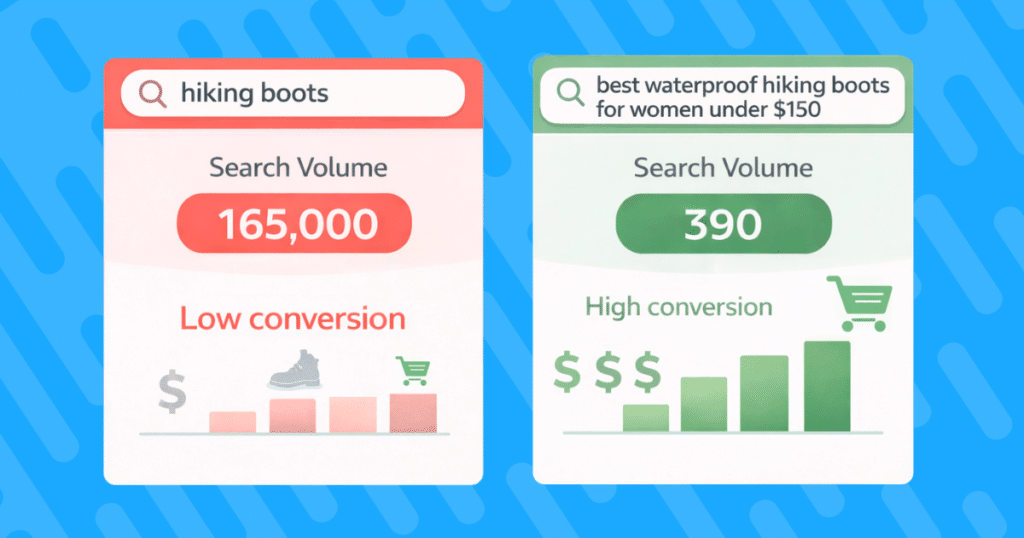
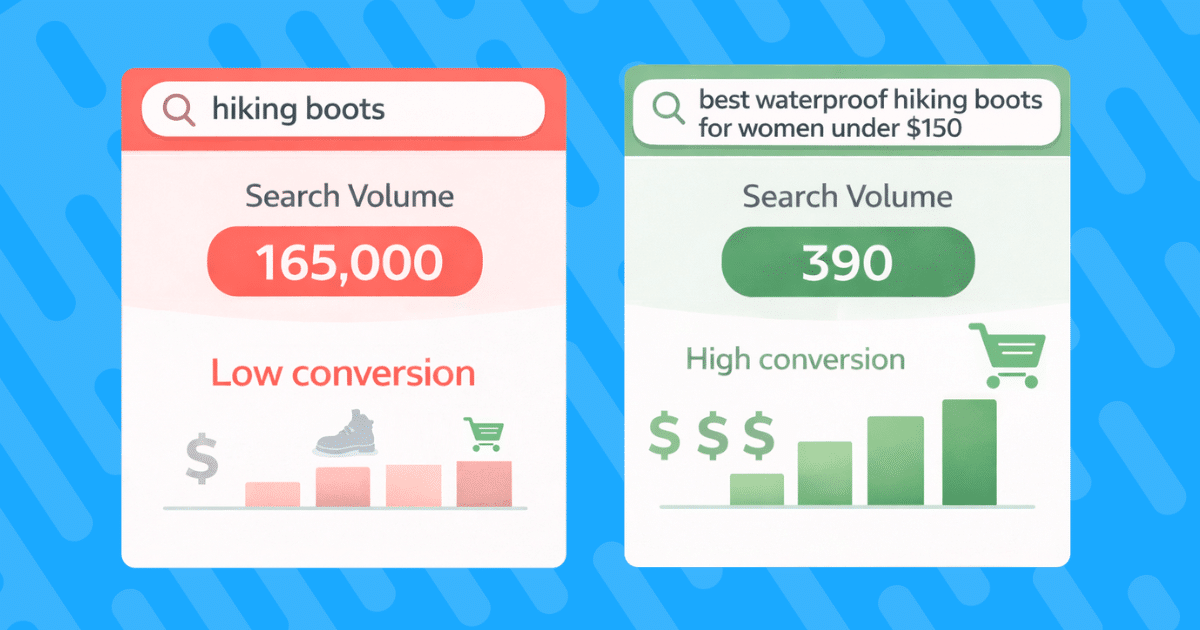
“hiking boots” = 165,000 monthly searches, low conversion rate
“best waterproof hiking boots for women under $150” = 390 monthly searches, high conversion rate
The second query tells you exactly what that shopper wants. They’re not researching, they’re ready to buy.
Don’t overlook local intent either. Nearly half of searches have local intent, yet most affiliates ignore geographic modifiers. Adding location-based keywords like “best DSLR camera UK” or “running shoes Australia” captures international buyers you’re currently missing.
Step-By-Step Keyword Research Workflow
Step 1: Brainstorm seed terms with buyer intent
Start with product-focused phrases that signal purchase readiness:
- Best [product] for [specific use case]
- [Product] vs [competitor] comparison
- [Brand] [model] review
- Where to buy [product] in [location]
- [Product] deals/discounts/coupons
Step 2: Mine Google’s data goldmine
Use Google Keyword Planner, but don’t stop at basic metrics. Analyze the search engine results page (SERP) features for each keyword:
- Shopping ads present? High commercial intent.
- Featured snippets? Structure content to capture them.
- People Also Ask boxes? Answer those exact questions.
Step 3: Competitive gap analysis
Tools like Ahrefs or SEMrush reveal keywords your competitors rank for, but you don’t. Filter by:
- Keywords with “buy,” “best,” “review,” or “deal” modifiers
- Difficulty scores under 40 (easier wins)
- SERP positions 4-10 (striking distance)
Mapping Keywords to Funnel Stages
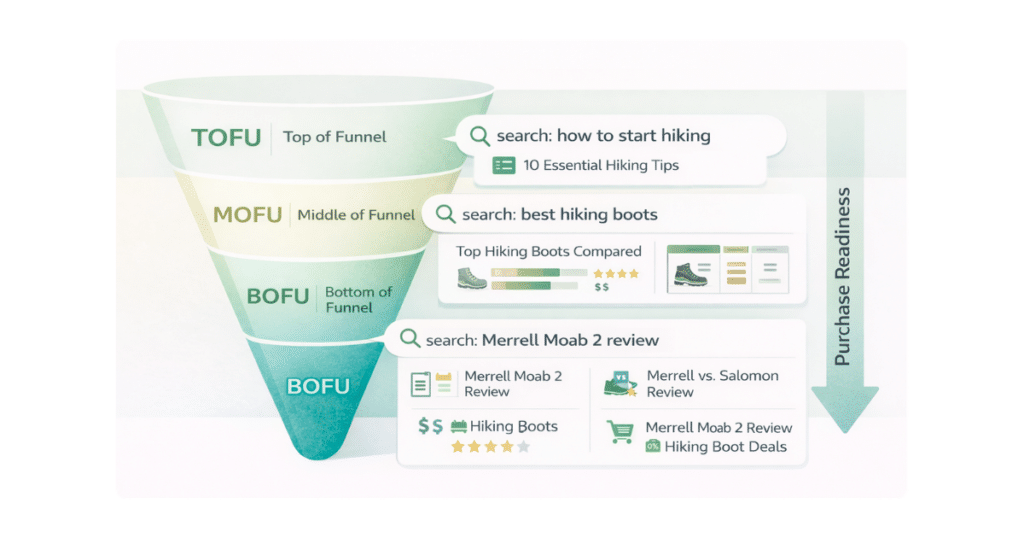
Match your content to where shoppers are in their journey:
Top of Funnel (TOFU) – Awareness Stage:
“How to choose hiking boots.”
“Mirrorless vs DSLR cameras”
Target these with educational guides that naturally mention products
Middle of Funnel (MOFU) – Consideration Stage:
“Best trail running shoes”
“Sony A7 III vs Canon EOS R”
Perfect for comparison posts and roundups
Bottom of Funnel (BOFU) – Decision Stage:
“Nike Pegasus 40 lowest price.”
“GoPro Hero 12 Black Friday deals”
These convert the highest. Create dedicated review pages
Crafting Content That Converts (TOFU-BOFU)
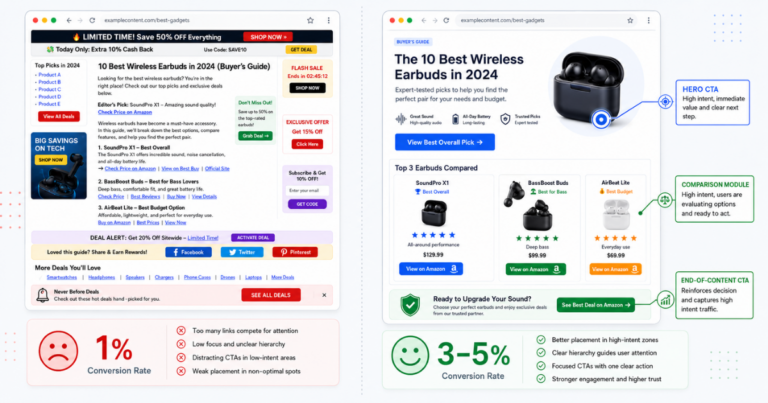
Keywords get visitors to your site. Content architecture determines whether they click your affiliate links.
Content Types That Move Shoppers
Ultimate Comparison Guides
These satisfy the research phase while positioning you as the trusted advisor. Structure them with:
- Quick comparison table upfront
- Detailed breakdowns of the top 3-5 options
- Clear winner for different use cases
- “Where to buy” section with multiple retailer options
In-Depth Single Product Reviews
Go deeper than surface-level features. Include:
- Real-world testing results (even if sourced from verified buyers)
- Pros and cons based on actual user feedback
- Who this product is (and isn’t) for
- Price tracking and deal alerts
Top 10 Listicles That Actually Help
Move beyond generic lists. Make yours stand out:
- Organize by use case, not arbitrary ranking
- Include a “quick picks” section for skimmers
- Add filtering criteria (budget, features, user type)
How-To Tutorials with Natural Product Integration
Teach first, sell second. Example: “How to Layer for Winter Hiking” naturally mentions specific gear throughout the guide.
Structuring Articles Around Questions & Objections
Here’s a revealing stat: 74% of U.S. consumers browse multiple affiliate sites before buying. They’re comparing your content against others, looking for the most complete answer.
Anticipate their concerns:
- Include frequently asked questions (FAQ) sections addressing common objections
- Create decision matrices comparing key features
- Add pros/cons tables for balanced perspectives
- Address the “Is it worth it?” question directly
Remember: shoppers don’t trust sites that only show positives. Acknowledging limitations builds credibility.
Link Placement & Call to Action (CTA) Best Practices
Strategic link placement beats link stuffing every time:
Natural context links flow within sentences: “The Sony A7 III excels in low-light conditions, making it perfect for event photographers.”
Action-oriented CTAs tell visitors exactly what happens next:
- “Check current price on Amazon.”
- “View this week’s deals.”
- “Compare prices across retailers.”
Multiple touchpoints without overwhelming:
- One link in the introduction for ready buyers
- Links within each product section
- Comparison table with clickable product names
- Final CTA after the conclusion
Always include clear affiliate disclosure language near your first link. Transparency builds trust and keeps you compliant. As an Amazon Associate, you may earn on qualifying purchases.
On-Page & Technical SEO Blueprint
You can have the best content in your niche, but technical issues will tank your rankings. Here’s your optimization checklist.
Core On-Page Elements
H1-H3 Hierarchy That Google Loves
Structure your headings logically:
- H1: Include primary keyword naturally
- H2s: Target related keywords and questions
- H3s: Break down detailed sections
Example hierarchy for “Best Trail Running Shoes: Tested on Real Terrain”:
H1: Best Trail Running Shoes: Tested on Real Terrain
H2: Quick Recommendations for Every Runner
H3: Best Overall: Salomon Speedcross 6
H3: Best Value: ASICS Gel-Venture 9
H2: How We Tested These Shoes
H2: Detailed Reviews of Top Picks
Meta Titles & Descriptions That Get Clicks
Your meta title has approximately 60 characters to convince someone to click. Make them count:
- Front-load the main keyword
- Include numbers for visual appeal
- Add emotional triggers (Best, Ultimate, Tested)
Meta descriptions (155 characters) should preview the value:
- Mention key differentiators
- Include a soft CTA
- Use power words that match search intent
Schema Markup for Rich Results
Implement review schema on product pages to display star ratings in search results. This can increase click-through rate significantly.
Mobile & Speed Optimization
Google prioritizes mobile-first indexing. Your site needs to load in under 2 seconds on mobile devices.
Quick wins:
- Compress images with tools like TinyPNG
- Enable lazy loading for below-fold content
- Minify CSS and JavaScript
- Use a content delivery network (CDN) for global audiences
- Choose a performance-focused host
Test with Google PageSpeed Insights monthly. Aim for scores above 90 on mobile.
Internal Linking & Content Siloing
Smart internal linking does double duty: it helps Google understand your site structure and keeps visitors engaged longer.
Contextual links between related posts: “If you enjoyed these hiking boots, check out our guide to waterproof hiking jackets.”
Related posts widgets keep visitors exploring: Place them after your main content but before comments.
Category siloing creates topical authority:
/hiking-gear/boots/
/hiking-gear/backpacks/
/hiking-gear/clothing/
This structure tells Google you’re an authority on hiking gear, not just random products.
Multi-Retailer & Global Localization Strategy
Relying solely on Amazon? That limits your conversions and leaves you vulnerable.
Diversify Your Merchant Mix
Amazon might be the largest, but it’s not the only option. Here’s why diversification matters:
Commission protection: When Amazon reduced rates in 2020, single-retailer affiliates saw income drop 50% overnight
Shopper preferences vary: Some buyers prefer Walmart’s pickup options, others want Best Buy’s extended warranties
Stock availability: If Amazon’s out of stock, you lose the sale entirely with single-retailer links
Geographic advantages: UK shoppers might prefer Argos, Canadians might choose Canadian Tire
Join multiple programs:
- Amazon Associates (still important, just not everything)
- Walmart Affiliate Program
- Best Buy
- Target Affiliates
- Specialty retailers in your niche
Automatic Localization That Captures Global Sales
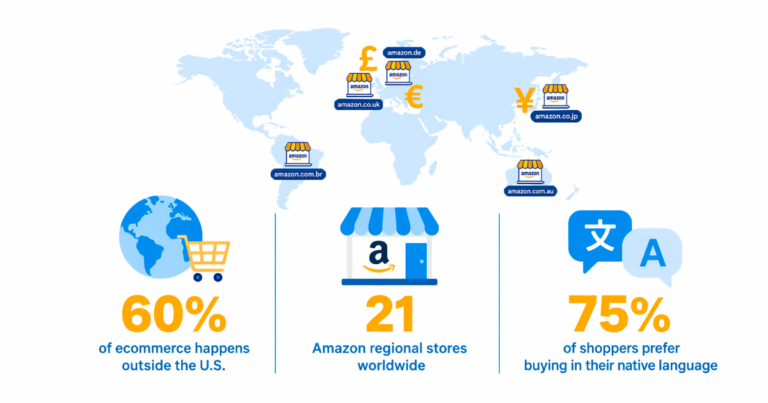
Here’s an important truth: if you’re only using Amazon.com links, you’re losing money on every international click. When a UK visitor clicks your .com link, they see U.S. prices, U.S. shipping costs, and often can’t even order.
Smart localization automatically routes visitors:
- UK traffic to Amazon.co.uk
- Canadian traffic to Amazon.ca
- German traffic to Amazon.de
- Australian traffic to Local retailers
This isn’t just theory. Affiliates using automatic localization see an average 8.7x return from capturing these foreign commissions they previously missed entirely.
Implementing Choice Pages
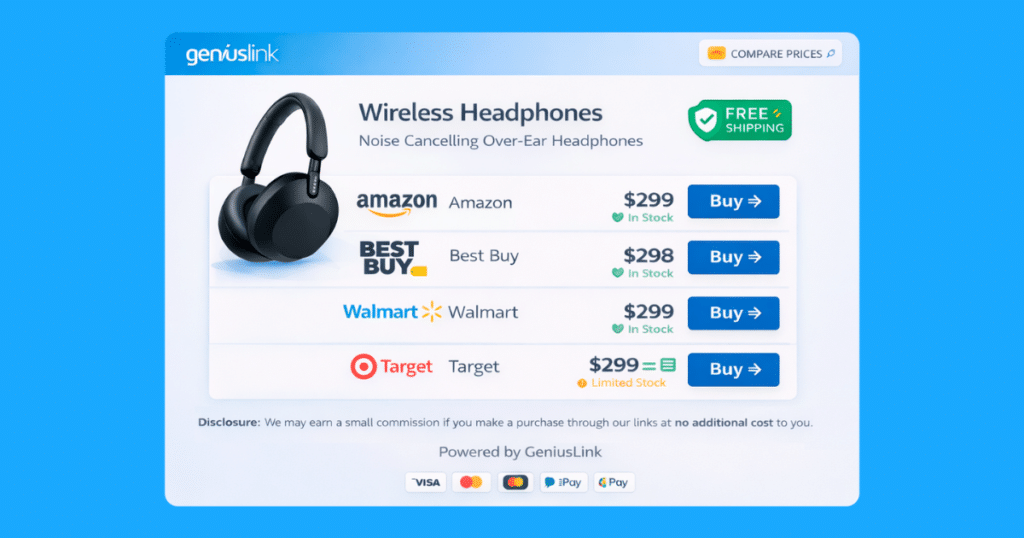
Instead of forcing shoppers to one retailer, give them options. Choice Pages present multiple buying options on a clean, mobile-friendly page.
The results speak volumes: affiliates using Choice Pages see commissions more than double compared to single-retailer links. One affiliate reported their income “skyrocketed by over 2.6x” after switching.
Why they work:
- 78% of shoppers prefer to compare before buying
- Visitors stay in your funnel instead of leaving for Google
- Out-of-stock situations don’t kill the sale
- Different shoppers have different retailer loyalties
Implementation steps:
- Build a Choice Page in seconds using your product links
- Add buttons for each retailer you’re affiliated with
- Place the Choice Page link in your content
- Monitor which retailers convert best for each product
- Reorder buttons based on performance data
Smart Link Management & Tracking Framework
Flying blind with your affiliate links? That’s like driving with your eyes closed. You need data to make informed decisions.
Why “Set & Forget” Fails
Most affiliates create links and never look back. Meanwhile, they’re missing crucial insights:
- Which traffic sources actually generate revenue (not just clicks)
- What content converts vs. what just attracts browsers
- Geographic patterns in buying behavior
- Device preferences affecting conversion rates
Without proper tracking, you’re optimizing based on guesses, not data.
Tagging Conventions & Folder Structures
Implement a systematic tagging strategy from day one. Professional link management lets you tag every link with campaign information.
Channel tags identify traffic sources:
blog_post_hiking_boots
youtube_review_sony_a7
email_newsletter_black_friday
pinterest_summer_gear_guide
Campaign codes track specific promotions:
black_friday
summer_sale_june
back_to_school
Product group folders are organized by category:
/cameras/mirrorless/
/cameras/dslr/
/outdoor/hiking/boots/
/outdoor/camping/tents/
Add Urchin Tracking Module (UTM) parameters for your own analytics, and include notes like “Updated with holiday pricing.”
Reading the Reports & Acting on Insights
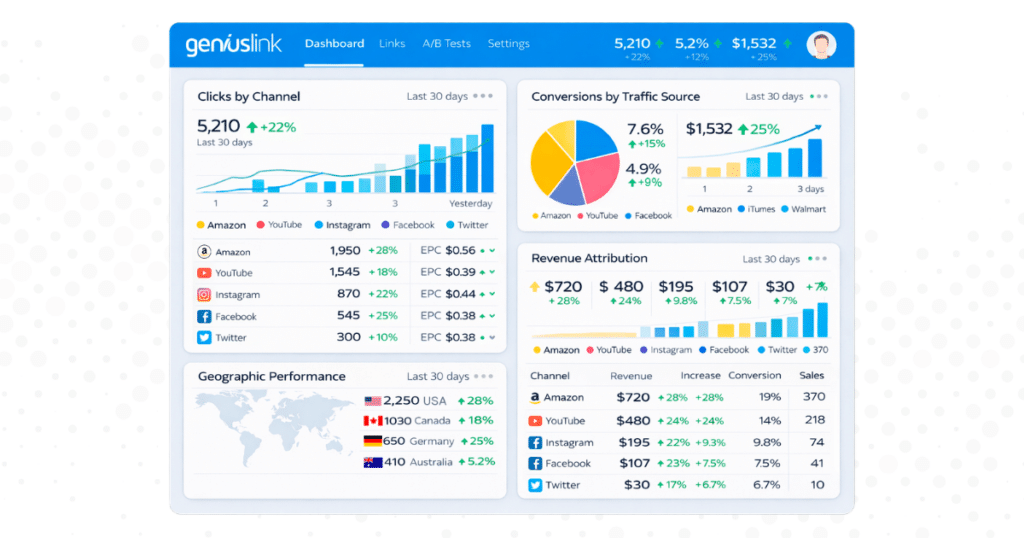
Data without action is just numbers. Here’s how to use your reports:
Click-to-revenue attribution: If your “Yosemite Camping Gear” posts generate 5x more revenue than general hiking content, what’s the lesson? Create more location-specific gear guides.
Geographic performance: Notice UK traffic converts higher on certain products? Create UK-specific buying guides with local retailer options.
Device insights: Mobile traffic not converting? Your mobile experience might need work, or you might need different CTAs for mobile users.
Time-based patterns: See conversion spikes during certain hours? Schedule social media posts and emails accordingly.
Feed these insights back into your content calendar. Document what works per channel so growth compounds over time.
Retargeting & Re-Engagement Funnels
Prepare for this stat: over 97% of visitors leave without buying. But here’s the thing: they’re not lost causes.
The 97% Non-Buyer Problem
That 97% includes:
- Comparison shoppers gathering information
- People were interrupted before completing research
- Visitors who need budget approval
- Shoppers waiting for payday or sales
They showed interest by clicking your affiliate link. Now you need to bring them back.
U.S. advertisers understand this. Retargeting budgets increased 20% year-over-year. Why? Because it works. These visitors already know what they want; they just need a nudge.
Building Segmented Audiences
Not all non-buyers are equal. Segment them based on behavior:
High-intent browsers:
- Clicked multiple product links
- Spent 3+ minutes on review pages
- Viewed comparison tables
Cart abandoners:
- Clicked through to the retailer
- Added items to cart (track with enhanced e-commerce)
- Left without purchasing
Repeat visitors:
- Returned to the same product pages
- Browsing across multiple sessions
- Engaging with your email content
With Geniuslink’s pixel attachment, you can automatically drop Facebook or Google remarketing pixels when someone clicks your affiliate links.
Creative & Offer Alignment
Match your retargeting message to the segment:
For comparison shoppers:
- Video reviews highlighting key differences
- Comparison charts
- Expert recommendations based on use case
For cart abandoners:
- Limited-time discount codes
- Free shipping reminders
- Stock scarcity warnings
For repeat browsers:
- Customer testimonials
- Warranty/guarantee information
- Payment plan options
Case studies show this segmentation approach can boost conversion rates substantially. Generic “come back!” ads don’t cut it anymore.
Continuous Optimization & Content Refresh
Your published content isn’t done; it’s just getting started. The real gains come from systematic improvement.
Identifying Quick-Win Posts
Use Google Analytics and Search Console to find:
Posts ranking on page 2: These are striking distance from serious traffic. Minor improvements can yield big results.
High-traffic, low-conversion content: Traffic without conversions is wasted. These posts need better CTAs or product integration.
Seasonal content before peak season: Update gift guides in October, not December. Get ahead of the competition.
Posts with declining traffic: Google favors fresh content. Regular updates maintain rankings.
How to Refresh for Fast Gains
Update statistics and references: Refresh with current data, update prices, and add new product releases.
Improve content depth: Add new sections that answer questions from the People Also Ask boxes.
Enhance user experience:
- Add jump links for long content
- Include more visual elements
- Improve mobile formatting
- Speed up load times
Expand product coverage: Add new models, alternatives, or budget/premium options.
Strengthen CTAs: Test different button colors, placement, and copy.
Pro tip: Add “Last Updated” dates to show freshness. Google and readers both appreciate transparency.
Mini Case Study: 3x Traffic in 6 Months
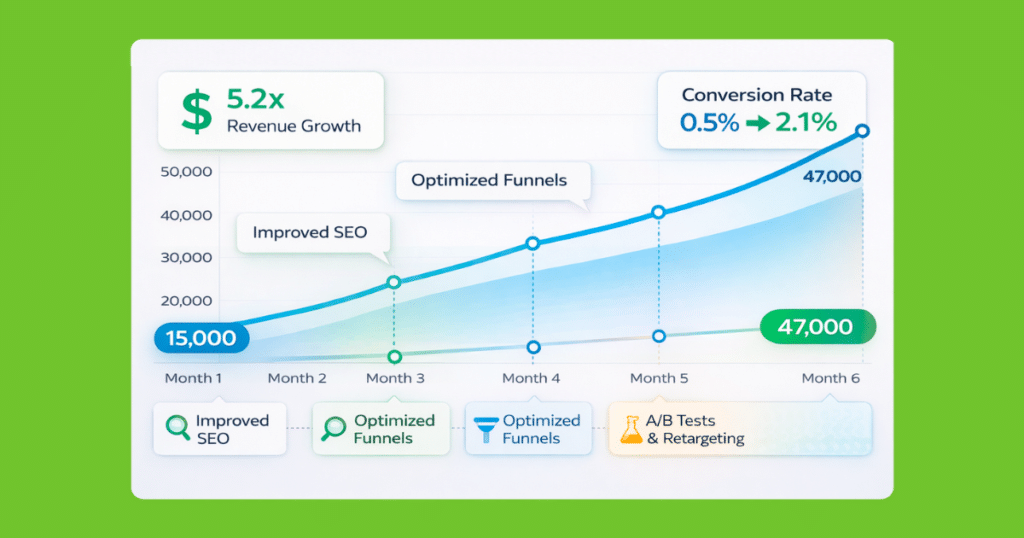
Let’s walk through how one outdoor gear site tripled its traffic (and quintupled revenue) using these strategies.
The Problem: Despite publishing quality content, organic traffic plateaued at 15,000 monthly visitors. Conversion rates hovered around 0.5%, with 95% of revenue coming from Amazon.com links.
Actions Implemented:
Month 1-2: Keyword Strategy Overhaul
- Shifted focus from generic terms to buyer-intent long-tails
- Identified 50 “best [product] for [specific use]” opportunities
- Added local modifiers for international markets
Month 2-3: Multi-Retailer Implementation
- Joined 8 additional affiliate programs
- Implemented Choice Pages on the top 20 products
- Set up automatic localization for international traffic
Month 3-4: Tracking & Optimization
- Tagged all links by channel and product category
- Discovered YouTube traffic converted 3x better than Pinterest
- Shifted content promotion strategy accordingly
Month 4-6: Retargeting & Refresh
- Attached pixels to all outbound links
- Created segmented Facebook campaigns for browsers
- Updated 30 existing posts with better product integration
Measurable Outcomes:
- Traffic: 15,000 to 47,000 monthly visitors
- Conversion rate: 0.5% to 2.1%
- Revenue: 5.2x increase
- International commissions: 0% to 23% of total revenue
Key lesson? Measuring and optimizing based on data beats publishing more content. Quality and strategic improvements compound faster than quantity alone.
Common Pitfalls to Avoid
Learn from others’ missteps:
Keyword cannibalization: Publishing multiple posts targeting the same keyword confuses Google. Consolidate similar content into comprehensive guides.
Missing disclosure statements: The Federal Trade Commission (FTC) requires clear disclosures about affiliates. Place them prominently near your first affiliate link.
Ignoring page speed: Every second of load time costs conversions. A 3-second load time can cut mobile conversions in half.
Single-merchant dependency: When Amazon reduces commissions (and they have), diverse revenue streams keep you stable.
Set-and-forget linking: Links break, products disappear, deals expire. Regular audits prevent lost revenue.
Thin content: 300-word “reviews” don’t cut it anymore. Google rewards depth and genuine value.
Over-optimization: Keyword stuffing and unnatural link placement trigger penalties. Write for humans first.
15-Point Action Checklist
Ready to implement? Here’s your priority order:
Week 1: Foundation
- Research 10 new long-tail buyer-intent keywords
- Audit your top 5 posts for optimization opportunities
- Join 3 additional affiliate programs beyond Amazon
- Set up link tracking with proper tagging
Week 2: Implementation
- Create your first Choice Page for the top product
- Implement Facebook pixel on outbound clicks
- Update meta descriptions on the top 10 pages
- Add FAQ sections to 3 high-traffic posts
Week 3: Optimization
- Set up automated localization for international traffic
- Create retargeting audiences based on click behavior
- Improve page speed on mobile (target sub-2 seconds)
- Add comparison tables to review posts
Week 4: Scale
- Document top-performing content patterns
- Create a content calendar based on data insights
- Launch the first retargeting campaign with segmented creative
Conclusion & Next Steps
Increasing affiliate traffic isn’t about gaming algorithms or chasing vanity metrics. It’s about understanding what converts and systematically improving based on data.
The affiliates achieving strong results right now share common traits:
- They target buyer-intent keywords, not just volume
- They measure everything and optimize based on results
- They diversify traffic sources and merchant relationships
- They treat visitors as people, not clicks
Your next step? Pick three items from the action checklist and implement them this week. Start with proper link tracking because you can’t improve what you don’t measure.
Remember: sustainable growth comes from compound improvements, not instant solutions. Tag your links, test what works, and feed those insights back into your content strategy. When you combine strategic keyword targeting with data-driven optimization and tools like Choice Pages, you create a system that grows stronger over time.
The affiliates seeing 3x, 5x, and even 8x growth aren’t just fortunate. They’re systematic. Time to join them.
Thank you for your support! As an Amazon Associate, we earn on qualifying purchases. Link commissions help support this site and allow us to continue providing valuable content.
Ready to implement a data-driven affiliate strategy? Try Geniuslink free for 14 days and see how proper tracking and optimization can transform your affiliate revenue.
Author
Author