
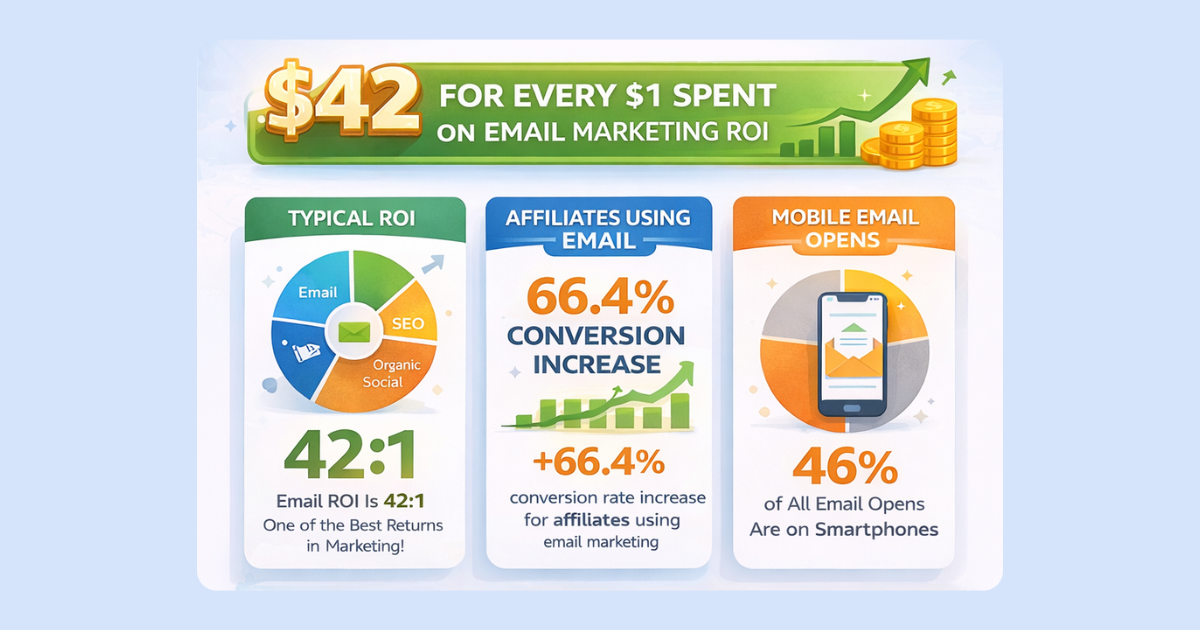
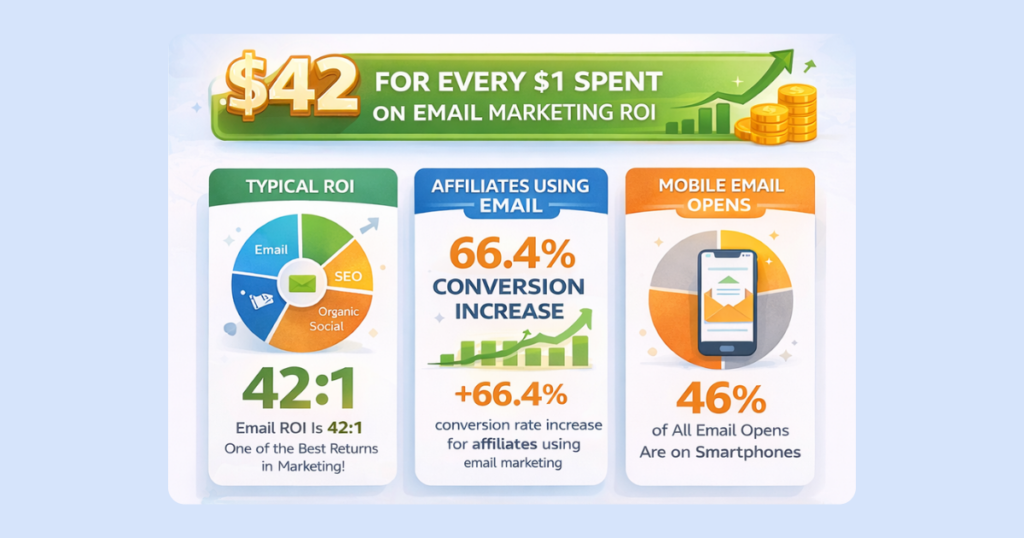
Email is the affiliate marketer’s most reliable channel, and it’s also more compliance-friendly than many publishers assume. Litmus research shows email generates approximately $36 in revenue for every $1 invested, a return that consistently outperforms paid social, display advertising, and most other digital channels. Amazon Associates, the world’s most widely used affiliate program, does permit affiliate-tracked links in email, but only under specific conditions. Getting those conditions wrong can affect your account standing.
This guide covers what Amazon’s email policy actually requires, why a Multi-Retailer landing page often outperforms a direct link anyway, how to build a list that converts, how to segment and nurture subscribers toward purchase decisions, and how to track performance down to the individual campaign level.
Why Email Lists Matter for Affiliate Marketing
Every email subscriber voluntarily chose to hear from you. Unlike search traffic driven by algorithms or paid traffic driven by ad spend, an email list is an audience you own outright. No platform change takes it from your control, and no algorithm decides how many subscribers see each message.
Litmus’s $36 ROI figure reflects this structural advantage. Email reaches people who already trust your recommendations, which translates directly into higher engagement and purchase rates than cold traffic.
Segmentation amplifies these results further. Mailchimp’s study of over 11,000 campaigns found segmented lists produce 14% higher open rates than non-segmented campaigns sent by the same publishers. When subscribers receive content relevant to their specific interests rather than generic broadcasts, they engage more frequently and convert more readily.
Mobile behavior shapes how your list performs. A substantial share of email opens now happens on smartphones, creating both an opportunity and a friction point. The opportunity: mobile shoppers are active and ready to buy. The friction point: standard affiliate links can add extra steps to the mobile purchase experience, and some of those sales go uncaptured as a result. The optimization section below addresses this.
Amazon Associates and Email: What’s Actually Required
Amazon’s Associates policies permit you to include Special Links, meaning links carrying your Associates tracking ID, in emails, SMS, and direct messages from your social media sites. This is stated directly in the current Participation Requirements: such communications must be solicited, meaning the recipient opted in to receive them from you, and must otherwise comply with the Operating Agreement, Trademark Guidelines, and Amazon Brand Usage Guidelines.
That single word, solicited, is where most publishers run into trouble. Sending affiliate links to a purchased list, a scraped list, or anyone who did not specifically opt in to hear from you is a policy violation, regardless of how the link itself is formatted. A handful of other requirements apply to any email containing Special Links:
- Disclosure. Every communication containing affiliate links must include a clear, conspicuous statement of the affiliate relationship, consistent with FTC guidelines from the Federal Trade Commission (FTC).
- No disguised destinations. Amazon prohibits cloaking, hiding, or otherwise obscuring where a link leads, and prohibits link shorteners used in ways that make the destination unclear.
- No silent redirects. A link that routes a customer through an intermediate page without requiring them to click something or take another affirmative action on that page can disqualify the resulting purchase from commission. Any Multi-Retailer landing page you use needs to require an actual click-through, not an automatic pass-through.
- Trademark compliance. Amazon Marks can’t be used in a way that implies endorsement beyond what’s authorized, and email-specific restrictions still apply to certain uses, such as attaching Amazon Marks to anything not tied to a proper Special Link.
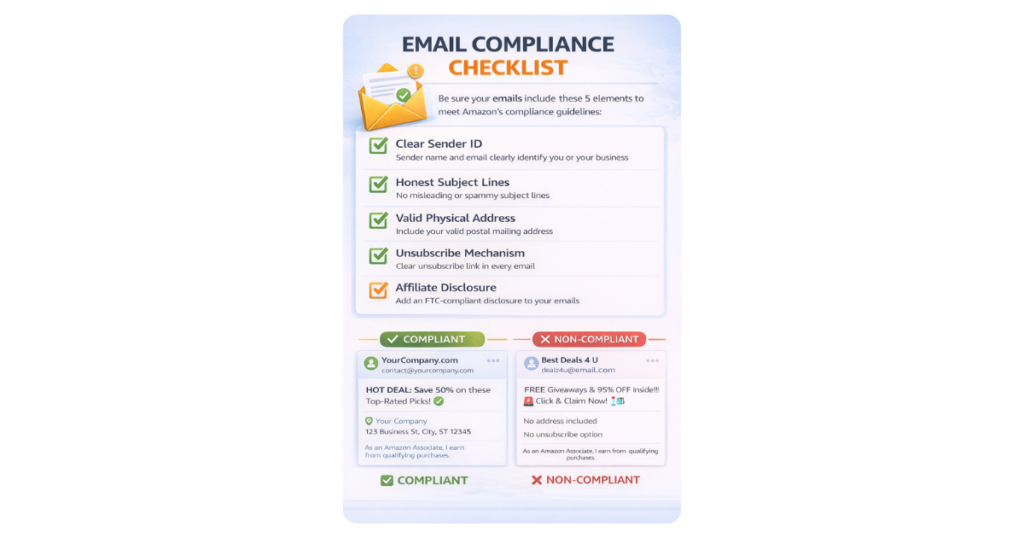
So the compliance question isn’t whether you can put an Amazon link in an email. You can, if your list is solicited and you disclose properly. The more useful question is what actually performs best once you’re in-bounds, and that’s where a Multi-Retailer approach earns its place.
The Optimization Layer: Geniuslink Choice Pages in Email
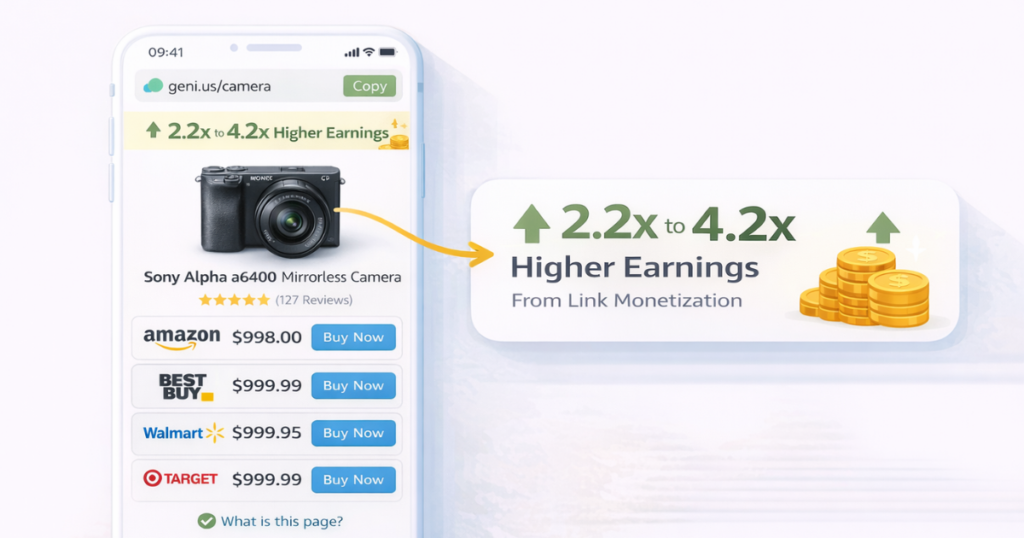
Geniuslink’s Choice Pages function as standalone landing pages that present multiple retailer options for a product. A subscriber clicks through from your email, lands on a clean, mobile-optimized page showing the product across Amazon, Walmart, Target, and any other retailers you’ve selected, and picks their preferred store to complete the purchase. This satisfies Amazon’s affirmative-action requirement, since the customer has to choose and click rather than being passed through automatically.
The case for using a Choice Page instead of a direct Special Link isn’t about working around a restriction. It’s about performance and operational simplicity.
Higher earnings per click (EPC). Instead of sending every subscriber to a single retailer regardless of preference, you let them choose. Some readers prefer Walmart’s pricing, others are Target loyalists, and many will go to Amazon. A Choice Page captures commissions from all of them through a single link. Across 11 A/B tests, Geniuslink found an average 2.2x improvement in EPC when switching from direct single-retailer links to Choice Pages, with individual tests reaching 4.2x. Amazon conversions in those tests also increased because readers who compared options and selected Amazon arrived with stronger purchase intent.
One link to manage per product. Rather than maintaining separate Amazon, Walmart, and Target links, you build one Choice Page per product and deploy that URL consistently across emails, social posts, and content pieces.
Built-in disclosure. The page automatically surfaces FTC-appropriate disclosures for each retailer shown. This doesn’t replace the disclosure required in the email body, but it removes another place things can be missed.
Setup is fast. Paste a product URL into Geniuslink’s Choice Page builder, select which retailers to include, and receive a single short URL to drop into your email.
How to Build a Choice Page in Minutes
- Paste the Amazon (or other retailer) product URL into the Choice Page builder.
- Confirm which additional retailers to include. The tool auto-populates matching listings.
- Publish and copy the generated short link.
- Drop that link into your email, and keep using the same link across future campaigns for that product.
Building a High-Converting Email List
List size matters far less than list quality. A smaller list of subscribers who actively want your recommendations and trust your judgment will consistently outperform a large list assembled through low-commitment giveaways or incentivized signups with no genuine interest in your content area.
Opt-In Placement and Timing
Opt-in forms perform best when they appear after a subscriber has already received value from your content. An inline form placed after a well-developed section of a buying guide converts better than a popup that fires immediately on page load, because the reader has already experienced your content quality. Exit-intent forms that appear when a visitor is about to leave are also effective, catching readers after they have absorbed content without interrupting the reading experience.
Beyond conversion performance, the opt-in step is also what makes every downstream email, including any that contain affiliate links, compliant with Amazon’s solicitation requirement. A clean, explicit opt-in isn’t just good practice. It’s what makes the rest of this guide usable.
Social proof elements alongside your opt-in form increase conversion rates: a subscriber count (if it is substantial), a short description of what subscribers receive and how often, and testimonials from current subscribers about the quality of your recommendations.
Lead Magnets That Attract Buyers
The most effective lead magnets for affiliate publishers solve a specific problem that naturally leads to product recommendations. A buying guide, product comparison, or category-specific checklist attracts readers actively researching a purchase, not readers who want free content with no purchase intent.
The distinction matters because buyers and freebie seekers behave differently on your list. A subscriber who downloaded your “Home Office Setup Guide” because they are about to furnish a workspace will respond to product recommendations differently than someone who grabbed a general productivity PDF. Design your lead magnet to attract subscribers who are ready to buy in your category.
Single vs. Double Opt-In
Single opt-in produces a larger list faster but includes subscribers who provided incorrect email addresses or had minimal intent. Double opt-in produces a smaller but more confirmed list, and it gives you an unambiguous, timestamped record of solicitation, which is useful if Amazon ever asks you to certify compliance. Litmus research found that single-opt-in programs show an 80% higher ROI than double-opt-in programs overall, because the confirmation step substantially reduces list size.
For affiliate publishers, a pragmatic approach is single opt-in for low-commitment lead magnets where volume matters, and double opt-in for ongoing newsletters where engagement quality and a clean compliance record are the priority.
Segmenting and Nurturing Subscribers
Segmentation mechanics begin at the moment of opt-in. Tag each subscriber based on which lead magnet they downloaded or which landing page they came from. These initial tags tell you a subscriber’s primary interest before you have sent a single email, giving you an immediate basis for relevance.
Behavioral tagging extends this over time. Track which links subscribers click, which product categories they show interest in, and which emails they open consistently. A subscriber who repeatedly clicks outdoor gear Choice Pages belongs in a different segment than one who engages primarily with tech content. These behavioral signals enable targeted campaigns that feel personal, not promotional.
Welcome sequences establish expectations and build trust before any product recommendation appears. A four- or five-email welcome series that delivers genuine value, shares your editorial approach, and demonstrates your expertise in your content area prepares subscribers to receive your recommendations as trusted advice, not advertising. Save the first affiliate recommendation for the end of this sequence, framed naturally within useful content.
List hygiene protects your sender reputation and your metrics. Subscribers who have not opened or clicked in three to six months reduce your deliverability and skew your performance data. A re-engagement campaign sent to inactive subscribers before removal gives them an opportunity to confirm interest. Those who do not respond are better removed than retained.
Writing Affiliate Emails That Convert
The emails that consistently generate affiliate commissions solve a problem and include a product recommendation within the solution, rather than leading with the product. This value-first structure is not a stylistic preference. It reflects how readers experience and process email content.
Subject Lines
Subject lines determine whether your email gets opened before anything else comes into play. Formats that tend to perform well include a specific, concrete benefit (“How to set up your home office for under $200”), a curiosity gap that implies useful information inside (“The one thing most people miss when buying a standing desk”), and personal framing that positions the email as advice rather than promotion. Avoid subject lines that make superlative claims or imply discounts that do not exist. Both can reduce open rates among experienced subscribers and trigger spam filters.
Email Structure
A reliable structure for affiliate emails opens by acknowledging a problem or situation your subscribers face, develops why this matters and what it costs them, and then presents a product recommendation as the practical solution. Place the Choice Page link about two-thirds of the way through the email, after you have provided enough context for the recommendation to feel reasoned rather than random. A second link in a short postscript captures readers who skip to the end.
Every email that includes an affiliate link, whether it points to a Choice Page or directly to Amazon, should carry its own disclosure statement near the top. Don’t rely on the destination page’s disclosure to cover the email itself.
Anchor text should describe what the subscriber gets when they click. “Compare prices across five retailers” or “See which stores have it in stock” performs better than “buy here” or “click this link,” because it tells the reader specifically what the next step involves.
Mobile Formatting
Single-column email layouts that adapt cleanly to small screens are the reliable choice for affiliate emails. Multi-column designs that work well on desktop can become cramped or misaligned on phones. Keep paragraphs short, use button-style calls to action rather than inline text links for your primary link, and ensure tap targets are large enough to click without accidental misfires. Test every email on at least one mobile device before sending.
Mobile Deep Linking: Closing the App Gap
Mobile visitors who click affiliate links from email apps face a specific friction point. Tapping an Amazon link in Gmail or Apple Mail typically opens a mobile browser rather than the Amazon app. The visitor lands on a page they need to log in to, and a meaningful share of visitors stop short of completing the purchase.
Geniuslink’s mobile deep linking resolves this by identifying whether the visitor has the retailer’s app installed and routing them directly into it. The subscriber taps the link in their email, the Amazon app opens at the product page, and they complete the purchase already authenticated. Geniuslink’s testing found up to 4.8x higher earnings and 7.9x more completed purchases from mobile traffic with deep linking enabled than with standard mobile web links. Every Geniuslink link includes this capability automatically.
For email lists with a large mobile readership, this is among the highest-impact changes available because it addresses a friction point on every mobile click, regardless of how well the email itself is written.
Tracking, Analytics, and A/B Testing
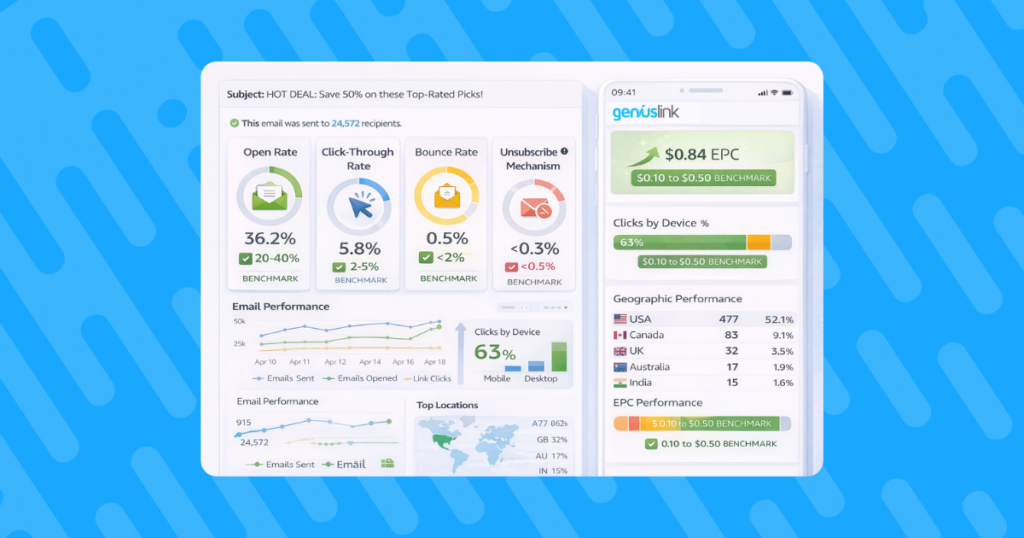
Attribution is the difference between knowing email works and knowing which emails, subject lines, segments, and products drive revenue. The Geniuslink analytics dashboard provides the data structure that enables this attribution.
Use campaign tags appended to your Choice Page URLs to identify each click’s source. A tag like “?track=newsletter-june-yoga” tells Geniuslink’s dashboard that this click came from your June newsletter promoting a yoga mat. Applied across all campaigns, this tagging practice builds a dataset that shows EPC by campaign, segment, and product category over time.
The patterns that emerge from four to six weeks of consistent tagging are more useful than any industry benchmark. Knowing that your tech-segment subscribers produce three times the EPC of your general-interest segment is an audience-specific insight that no third-party data can provide.
A/B testing in Geniuslink allows you to split traffic between configurations and measure outcomes directly. Useful tests for email affiliate marketers include comparing a Choice Page to a direct Amazon link for the same product, different retailer ordering on a Choice Page, and different anchor text for the same link. Run one test at a time, let it accumulate enough clicks to produce reliable data, and document the outcome before moving to the next variable.
International Traffic in Email Lists
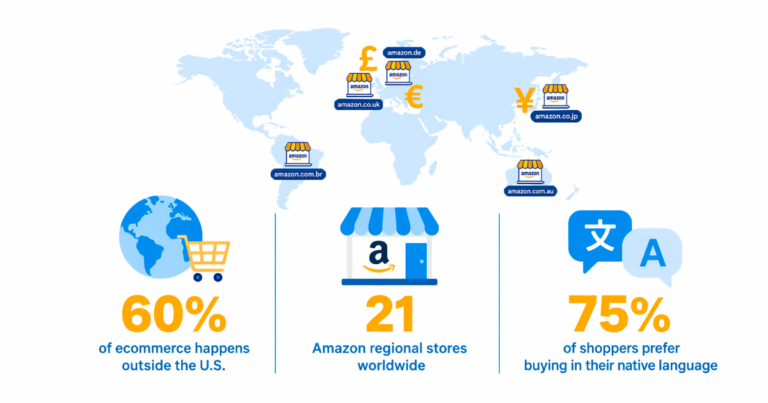
Email lists collected through organic search or social channels typically contain a meaningful share of international subscribers, even for content produced in English for a primarily domestic audience. Without localization, international subscribers who click through to Amazon.com earn you no commission, since your US tracking ID applies only to the US storefront.
Geniuslink’s localization tools route each click to the appropriate regional Amazon storefront with your local program tracking ID. A UK subscriber reaches Amazon.co.uk. A Canadian subscriber reaches Amazon.ca. Geniuslink’s data shows a roughly 5% increase in total revenue for each 10-point increase in international traffic when localization is properly configured. For email lists with significant international readership, this is incremental revenue from traffic you are already generating.
Common Mistakes That Reduce Email Affiliate Revenue
Emailing a non-solicited list. Amazon’s policy permits affiliate links in email only to recipients who explicitly opted in. Purchased lists, scraped contacts, or anyone added without clear consent can affect your account standing, regardless of how the link is formatted.
Skipping the in-email disclosure. A Choice Page’s built-in disclosure doesn’t substitute for a disclosure statement in the email itself. Both are required.
Using a redirect that doesn’t require a click. Any intermediary page needs to make the customer actively choose and click through. A page that auto-forwards a visitor to Amazon without requiring an affirmative action can disqualify the resulting purchase from commission.
Promoting multiple products in a single email. Each additional product recommendation dilutes attention from all the others. One well-contextualized recommendation per email outperforms a roundup of five loosely related products in nearly every test.
Missing mobile optimization. An email that reads well on desktop but is difficult to navigate on a phone loses a meaningful share of its potential conversions before a single link is clicked. Test on mobile before every send.
Sending to inactive subscribers. Retaining subscribers who have not engaged in six months reduces your open and click rates, affects deliverability, and inflates your list size without adding revenue. Regular hygiene keeps your metrics accurate and your sender reputation intact.
Putting It Together: A 30-Day Implementation Plan
Week one: Create Choice Pages for your five to ten top-selling products. Test each link to confirm it routes correctly to all selected retailers, that the FTC disclosure appears, and that the mobile experience works on both iOS and Android.
Week two: Design and launch a buyer-intent lead magnet. Focus on a specific purchasing decision your target subscriber faces. Connect your opt-in form to your email service provider, configure your welcome sequence, and add initial interest tags based on the lead magnet topic.
Week three: Segment your existing list if you have one. Identify your primary interest categories, create segments based on past click behavior or signup source, and draft one targeted campaign per segment using the value-first email structure described above.
Week four: Run your first A/B test. Choose your highest-traffic Choice Page and test a direct Amazon link versus the Choice Page on a 50/50 split. Tag both variants in Geniuslink and measure EPC for each after the test period ends. Document the result and apply the finding to your next content campaign.
Start a free trial to build your first Choice Pages, set up campaign tracking tags, and enable mobile deep linking across your email affiliate links.
Frequently Asked Questions
Can I use Amazon affiliate links in emails? Yes, with conditions. Amazon’s Associates policies permit Special Links, meaning links carrying your Associates tracking ID, in email, SMS, and direct messages, provided the recipient explicitly opted in to receive them from you and you meet disclosure and trademark requirements. Many publishers still prefer linking to a Geniuslink Choice Page instead of a direct Special Link, since it lets subscribers pick their preferred retailer, keeps disclosure handling consistent, and has shown higher EPC meaningfully in testing.
Do I need to include a disclosure in every email? Yes. The FTC requires clear and conspicuous disclosure of affiliate relationships in any content that promotes products for compensation, including emails. A simple line such as “This email contains affiliate links. I earn on qualifying purchases made through them, at no additional cost to you” placed near the top of the email satisfies this requirement. Choice Pages also automatically display disclosures for each retailer, but this does not replace the disclosure in the email itself.
How do I track which emails drive the most affiliate revenue? Append a campaign tag to your Choice Page URL each time you use it in an email. For example, adding “?track=july-newsletter-yoga” to your Choice Page link lets Geniuslink’s analytics attribute every click from that email to that specific campaign. Over time, comparing EPC across tagged campaigns reveals which email formats, segments, and product categories drive the most revenue for your specific audience.
What email service provider should I use? Geniuslink’s Choice Page links and tracking tags work with all major email service providers since they are standard URLs with query parameters. Choose an email service provider based on the segmentation and automation capabilities your strategy requires. Key features to look for include behavioral tagging, triggered automations, and list segmentation. The specific platform matters less than whether you will consistently use its segmentation and automation tools.