

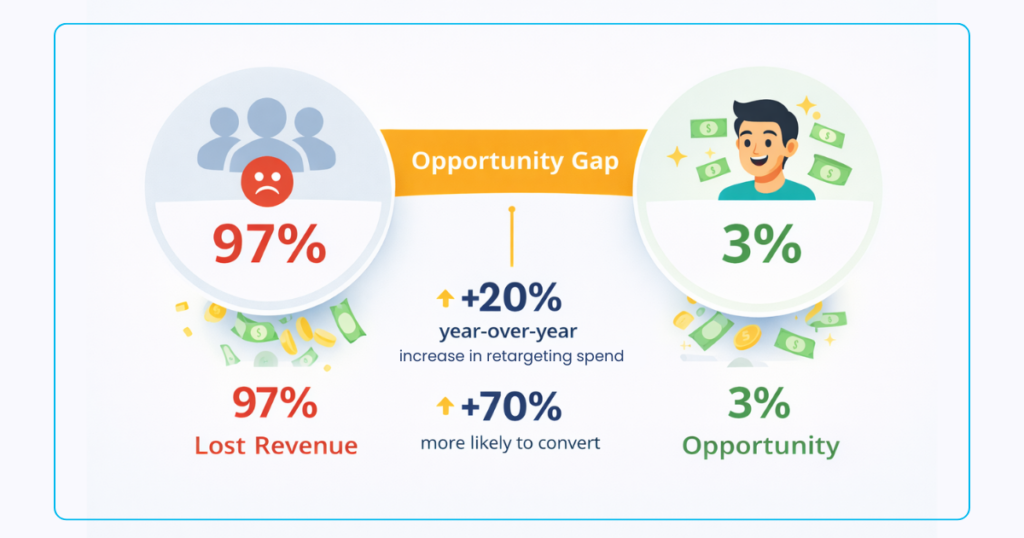
Here’s a significant challenge: 97% of people who click your affiliate links won’t buy on their first visit. That’s millions in lost commissions walking away every single day. But what if you could bring those potential customers back?
Traditional retargeting requires owning the destination site, something affiliate marketers can’t do when sending traffic to Amazon, Walmart, or other retailers. The solution? Link-level retargeting that captures intent-based audiences from any click, anywhere. This guide shows you exactly how to implement pixel-powered smart links that turn one-time clicks into recurring revenue when earning on qualifying purchases.
You’ll discover the step-by-step process to add Facebook and Google pixels to your affiliate links, build segmented audiences based on product interest, and create multi-retailer landing pages that tests show can double your earnings per click. Plus, grab our free 9-Point Affiliate Retargeting Blueprint at the end for a complete implementation checklist.
Why Retargeting Matters in Affiliate Marketing
The numbers tell a compelling story. According to eMarketer, digital ad spend on retargeting has increased 20% year-over-year, and for good reason. Retargeted visitors are 70% more likely to convert than cold traffic. When 97% of your clicks leave without buying, that’s not just a statistic, it’s a significant revenue opportunity.
The psychology behind retargeting success is straightforward: familiarity breeds trust. Marketing research shows consumers need 7-8 touchpoints before making a purchase decision. Your first click plants the seed; retargeting nurtures it to harvest. Each subsequent exposure builds recognition and reduces the perceived risk of buying.
From a pure ROI (return on investment) perspective, retargeting outperforms cold traffic acquisition. While new customer acquisition costs continue climbing (up 60% over five years), retargeting typically delivers 3-10× higher conversion rates at 50-70% lower cost per acquisition. You’re marketing to an audience that already showed interest; they just need the right offer at the right time.
Consider this real-world comparison: Cold Facebook traffic might convert at 0.5-1% with a $50 CPA (cost per acquisition). That same budget spent on retargeting link clickers often yields 3-5% conversion rates with CPAs under $15. That’s the power of warm audiences.
The Traditional Retargeting Challenge for Affiliates
Affiliate marketers face a significant obstacle. Retargeting requires placing a tracking pixel on the pages your audience visits. For traditional businesses, that’s simple: add the Facebook or Google pixel to your site, and you’re set. But affiliates don’t own Amazon’s product pages or Best Buy’s checkout flow.
When you send traffic directly to a merchant’s site, that visitor disappears. You can’t pixel them, can’t build an audience, can’t bring them back. Your marketing ends at the click. The merchant captures all that valuable retargeting data while you’re left hoping for immediate conversions.
This creates a fundamental disadvantage. While merchants retarget your referred traffic with their own ads (using your hard work to build their customer base), you’re forced to acquire new cold traffic constantly. It’s expensive, exhausting, and unnecessarily limiting your earning potential.
How Link-Level Retargeting Works
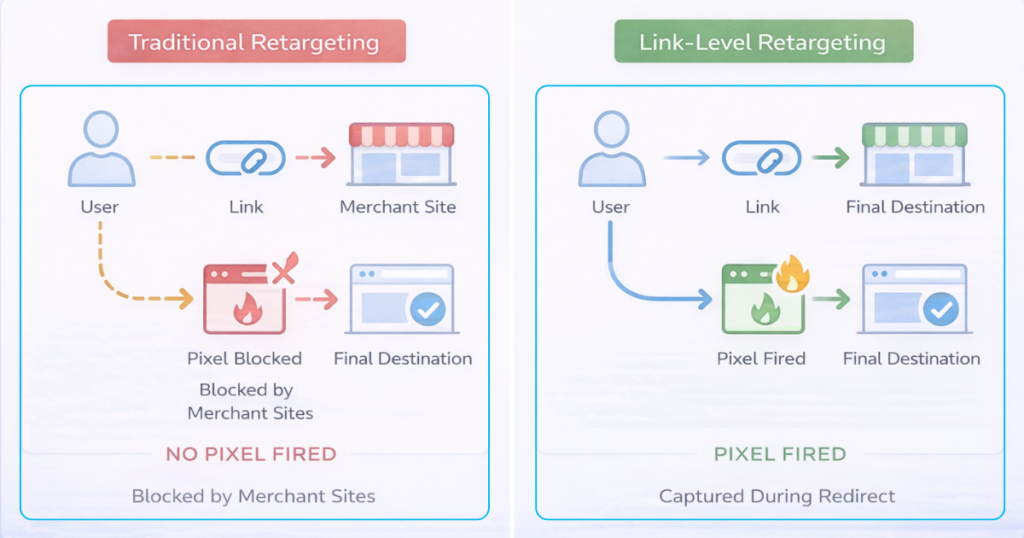
Smart link platforms like Geniuslink solve the pixel problem by firing tracking codes during the redirect. Instead of requiring access to the destination site, the pixel activates in the split second between the click and the final landing page.
Here’s the technical flow: Visitor clicks your link, the smart link platform receives the click, the pixel fires and captures the user, and the visitor continues to the merchant site. From the user’s perspective, it’s seamless. From your perspective, it’s powerful.
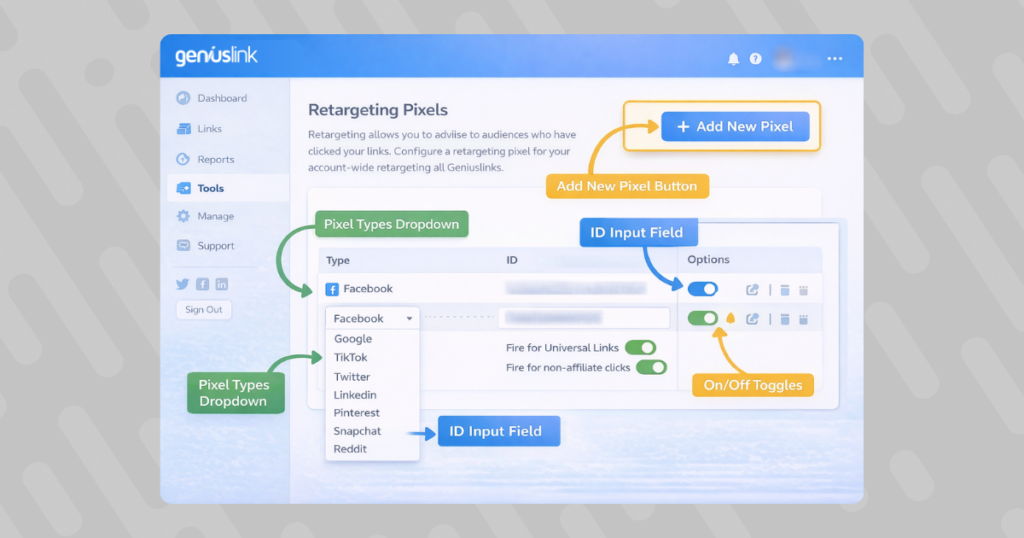
Currently supported platforms include:
- Facebook Custom Audiences – Build audiences for Facebook and Instagram retargeting
- Google Ads Remarketing – Create lists for Display Network and YouTube campaigns
- TikTok Pixel – Capture the fast-growing TikTok audience
- Generic Image Pixels – Support for other platforms via standard pixel implementation
The benefit of this system is its universal application. Whether you’re sharing links on social media, in emails, through paid ads, or on your blog, every click becomes a retargeting opportunity. You’re no longer limited by where you can place pixels. Anywhere you can share a link, you can build an audience.
Here’s a comparison of traditional versus link-level retargeting:
Traditional Site-Level Retargeting:
- Requires website ownership
- Limited to your domain visits
- Misses outbound traffic
- Complex multi-pixel setup
- No merchant site access
Link-Level Retargeting:
- Works on any destination
- Captures all link clicks
- Includes outbound traffic
- Centralized pixel management
- Full merchant compatibility
Building Intent-Based Audiences with Tracking Tags
Not all clicks are created equal. Someone clicking a link about running shoes has a different intent than someone exploring home coffee machines. That’s where Geniuslink’s five-level tagging taxonomy transforms basic retargeting into precision audience building.
The system uses five customizable tag categories:
- Campaign – Track specific promotions or seasonal pushes
- Source – Identify traffic origins (blog, YouTube, email)
- Medium – Distinguish paid versus organic, social versus search
- Term – Capture keywords or audience segments
- Content – Test different creatives or messages
Smart naming conventions multiply your targeting power. Consider this practical example: A fitness affiliate creates three tagged links for a November promotion:
- Link 1: Campaign: “black-friday” | Source: “blog” | Content: “home-gym”
- Link 2: Campaign: “black-friday” | Source: “youtube” | Content: “cardio-equipment”
- Link 3: Campaign: “black-friday” | Source: “email” | Content: “recovery-tools”
Now you can retarget based on interest (home gym enthusiasts), source (video watchers who need visual reinforcement), or campaign performance. When Black Friday arrives, you have pre-segmented audiences ready for targeted offers. That’s strategic audience building, not unfocused marketing.
Step-by-Step Pixel Setup (Facebook and Google)
Let’s walk through the exact steps to add retargeting pixels to your Geniuslink account. Before starting, ensure you have:
- Active Facebook Ads account with pixel created
- Google Ads account with a remarketing tag
- Geniuslink account (free trial works)
- At least one affiliate link ready to upgrade
Facebook Pixel Installation:
- Locate Your Pixel ID: In Facebook Business Manager, navigate to Events Manager. Your Pixel ID appears at the top (16-digit number).
- Access Geniuslink Tools: Log in to your dashboard, click “Tools” in the main navigation, then select “Retargeting Pixels.”
- Add Facebook Pixel: Click “Add New Pixel,” select “Facebook Custom Audience” from the dropdown. Paste your Pixel ID and give it a recognizable name like “FB Main Pixel.”
- Configure Settings: Toggle GDPR (General Data Protection Regulation) compliance if serving EU (European Union) traffic. This automatically disables pixel firing for European visitors unless you have consent management in place.
- Test Implementation: Create a test link with the pixel attached. Click it yourself and verify firing using the Facebook Pixel Helper Chrome extension.
Google Ads Remarketing Tag:
- Find Your Tag: In Google Ads, go to Tools> Settings > Audience Manager > Audience Sources. Copy your remarketing tag ID.
- Import to Geniuslink: Same process as Facebook: add new pixel, select “Google Ads Remarketing,” paste your tag ID.
- Conversion Tracking Setup: For advanced users, you can also add Google Ads conversion pixels to track actual sales through your links when earning on qualifying purchases.
- Verify with Tag Assistant: Google’s Tag Assistant Chrome extension confirms proper pixel firing on click.
Pro tip: Create separate pixels for each campaign or traffic source. This granular approach lets you track ROI down to the specific pixel level.
Crafting High-Converting Retargeting Campaigns
Building audiences is step one. Converting them requires strategic campaign design that acknowledges where these users are in their buying journey. They’ve already shown interest; your job is to remove the remaining friction.
Audience Size Thresholds:
Most platforms require minimum audience sizes before serving ads:
- Facebook: 1,000 users (though 5,000+ performs better)
- Google Display: 1,000 users in the last 30 days
- TikTok: 1,000 users minimum
Build audiences for 7-14 days before launching campaigns. This ensures sufficient size and captures users at peak interest.
Message-Match Principles:
Your retargeting creative should directly reference their original interest. If they clicked a “Best Wireless Earbuds Under $100” link, don’t show them generic electronics ads. Echo their specific intent with headlines like “Still Looking for Those Perfect Earbuds?”
The Offer Ladder Strategy:
Not everyone needs the same nudge. Structure your campaigns in escalating urgency:
- Days 1-3: Soft reminder with educational content (“5 Things to Check Before Buying Earbuds”)
- Days 4-7: Social proof emphasis (“Why 10,000+ Runners Choose These Earbuds”)
- Days 8-14: Urgency or incentive (“48-Hour Flash Sale on Your Viewed Items”)
- Days 15+: Alternative options (“Similar Earbuds You Might Love”)
Budget and Bid Strategies:
Warm traffic converts at a lower cost, so adjust your approach:
- Start with 50-70% of your cold traffic CPA as your target
- Use automatic bidding initially to find the sweet spot
- Expect 3-5× higher CTRs (click-through rates) than cold campaigns
- Budget 20-30% of acquisition spend on retargeting for optimal mix
Choice Pages: Multi-Store Landing Pages that Double EPC
Here’s a conversion insight: 78% of online shoppers prefer comparing options before purchasing. Yet most affiliate marketers force visitors to a single retailer. Choice Pages flip this dynamic by presenting multiple buying options on one clean, optimized page.
Testing revealed something remarkable. When comparing single-retailer links against Choice Pages, the multi-retailer option more than doubled average earnings per click. One publisher reported a 2.6× increase in income after switching. That’s not incremental improvement, that’s transformation.
The psychology makes sense. Different shoppers have different preferences:
- Some trust Amazon’s shipping and returns
- Others have Walmart+ memberships
- Price-conscious buyers want to see all options
- International visitors need local stores
Choice Pages accommodate everyone. The anatomy includes:
- Hero Image: Product photo that immediately confirms they’re in the right place
- Clear CTAs (calls to action): Distinct buttons for each retailer with prices when available
- Trust Elements: Automatic FTC (Federal Trade Commission) disclosures and SSL (Secure Sockets Layer) indicators
- Mobile Optimization: Thumb-friendly buttons and fast load times
Geniuslink automatically populates retailer options from 80+ integrated merchants. Just paste an Amazon link, and the system suggests Best Buy, Target, Walmart, and other relevant sellers. Your affiliate IDs attach automatically when earning on qualifying purchases, no manual configuration needed.
Real implementation example: A tech reviewer promoting laptops creates one Choice Page instead of juggling five different affiliate links. Visitors choose their preferred store, the reviewer earns from whichever they pick, and conversion rates increase because friction dropped.
Advanced Optimization Toolkit
Beyond basic retargeting and Choice Pages, Geniuslink’s platform includes several powerful features that compound your earnings. Let’s explore the most impactful tools for scaling success.
Geo-Targeting for the International Commission:
Amazon operates 20+ international stores, each with its own affiliate program. Without geo-targeting, a UK visitor clicking your Amazon.com link must manually switch to Amazon.co.uk, and you lose that commission. Geniuslink automatically routes clicks to the correct regional store.
The impact? Analysis of 2 million clicks showed an average EPC 38% higher when international routing was enabled. From $320,000 in tracked commissions, $142,000 came from non-US sources that would’ve been lost without geo-targeting.
Mobile Deep Linking Benefits:
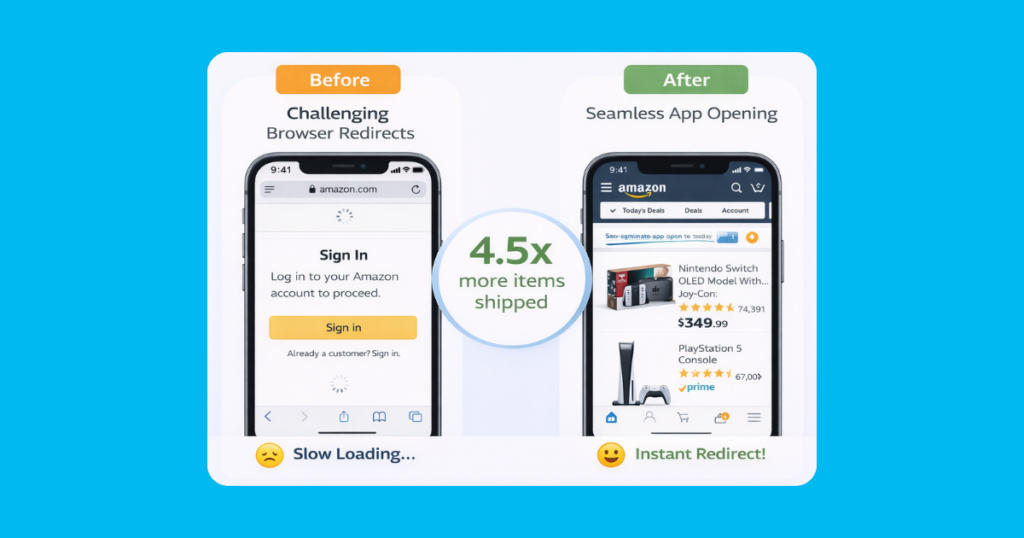
Mobile users who click affiliate links in apps often get redirected to the web browser, where they’re logged out. Conversion rates decline. Deep linking solves this by opening native apps when available.
A/B tests revealed significant improvements from deep linking:
- 4.5× more items shipped
- 7.9× higher conversion rates
- Reduction in cart abandonment
The setup is automatic: enable deep linking in your Geniuslink account, and every mobile click is routed to the best possible destination.
Traffic Split Testing:
Sometimes you need complex data to make decisions. Split any Geniuslink URL to send traffic to different destinations based on percentages. Test Amazon versus Choice Pages, other product variations, or even completely different offers.
The dashboard reports performance per split, making optimization scientific rather than guesswork. One affiliate discovered their photography audience converted 3× better on B&H Photo than Amazon, knowledge worth thousands in extra commissions when earning on qualifying purchases.
Link Health Monitoring:
Dead links kill commissions. Geniuslink monitors your links and alerts you when products go out of stock or pages break. Fix issues in minutes instead of losing days of traffic to error pages.
Compliance, Privacy, and Platform Policies
Retargeting with affiliate links requires navigating both privacy laws and merchant terms. Here’s how to stay compliant while maximizing performance.
GDPR and Privacy Considerations:
Geniuslink automatically disables retargeting pixels for EU visitors by default, protecting you from GDPR violations. With proper consent management, you can override this setting. Always ensure your privacy policy discloses your retargeting practices.
FTC Disclosure Requirements:
Choice Pages include automatic affiliate disclaimers that meet FTC guidelines. The disclosure appears prominently without disrupting the user experience. This built-in compliance means you can use Choice Page links anywhere
Platform-Specific Rules:
- Facebook: Requires landing pages for ads; Choice Pages qualify perfectly
- Google Ads: No direct affiliate links; Choice Pages provide the required value-add
The key is transparency. Always disclose affiliate relationships and respect user privacy choices. The tools handle technical compliance; you handle ethical marketing.
Measuring Success and Iterating for Scale
Data drives decisions. Geniuslink’s reporting suite provides the metrics you need to optimize and scale intelligently. Focus on these key performance indicators:
Primary Metrics:
- Earnings Per Click (EPC): Total commissions divided by total clicks, your north star metric
- Click-Through Rate: Measures link appeal and placement effectiveness
- Conversion Rate: Percentage of clicks that result in purchases
- Return on Ad Spend (ROAS): Revenue generated per dollar spent on retargeting
The dashboard breaks these down by tag, allowing micro-optimization. You might discover that “fitness-equipment” tags generate $0.15 EPC, while “fitness-supplements” yield only $0.04. That insight redirects your content strategy.
The Optimization Loop:
- Launch with broad segments
- Analyze tag-level performance after 1,000+ clicks
- Identify the top 20% of performers
- Reallocate budget to winners
- Create more content or campaigns around proven segments
- Test new angles with saved budget
This iterative approach compounds results. One travel affiliate started with general destination links, discovered “budget-travel-europe” tags performed 3× better than average, and pivoted their entire content strategy. Revenue tripled in 90 days.
Mini Case Studies and Proof Points
Theory meets reality in these documented success stories from real Geniuslink users who are implementing retargeting strategies.
Publisher A – Lifestyle Blog:
Starting point: $3,000/month Amazon commissions from Pinterest traffic.
Challenge: 98% bounce rate with no way to recapture visitors.
Solution: Added Facebook pixels to all links, built audiences by category,and launched retargeting campaigns to Choice Pages.
Result: Revenue doubled to $6,100/month in 30 days with just $500 in ad spend.
Influencer B – YouTube Tech Channel:
Problem: Mobile viewers couldn’t easily purchase featured products.
Approach: Enabled deep linking and created product-specific Choice Pages. Retargeted video viewers with time-sensitive offers.
Outcome: 4.5× increase in mobile conversions, added $18,000 in quarterly commissions when earning on qualifying purchases.
Media Site C – Deal Aggregator:
Situation: Thousands of daily clicks with sub-1% conversion.
Strategy: Segmented audiences by deal category, created urgency-based retargeting sequences.
Impact: Recovered 21% of abandoned clicks, generating an extra $2,400 monthly with 5:1 ROAS.
Each success story shares common elements: strategic audience segmentation, optimized landing experiences, and persistent testing. None required massive budgets or technical expertise, just smart application of the tools.
Quick-Start Checklist
Ready to implement? Here’s your action plan to launch affiliate retargeting in the next 24 hours:
Immediate Actions (Today):
- Create a free Geniuslink account at geniuslink.com
- Import Facebook and/or Google pixels from your ad accounts
- Set up default tags for your main content categories
- Convert your top 20 affiliate links to smart links
- Enable geo-targeting and mobile deep linking
Week 1 Goals:
- Build first custom audience (aim for 1,000+ users)
- Create 3-5 Choice Pages for best-performing products
- Launch initial retargeting campaign with modest budget
- Set up link health monitoring for all critical links
Month 1 Milestones:
- Analyze tag performance and identify top segments
- Scale winning campaigns and pause low performers
- Test traffic splits on highest-volume links
- Calculate ROI and plan expanded implementation
Conclusion and Key Takeaways
Affiliate link retargeting turns one-shot traffic into a recurring revenue stream. By capturing audiences at the point of click, not just on sites you own, you’re playing a different game than affiliates stuck in the old model.
The five-step framework is straightforward: Add pixels to links, tag for segmentation, build warm audiences, promote Choice Pages, optimize based on data. Each element multiplies the effectiveness of the others.
Remember, this isn’t about complex technical implementation. It’s about strategically re-engaging interested visitors with better options. Start small, test everything, and scale what works. The affiliates doubling their income aren’t necessarily working harder; they’re capturing value that was always there, just previously inaccessible.
Your next step is clear. Implementation beats contemplation every time.
Thank you for reading this guide. The commission earned on qualifying purchases through the links in this article helps support this site and allows us to continue creating helpful retargeting content like this.