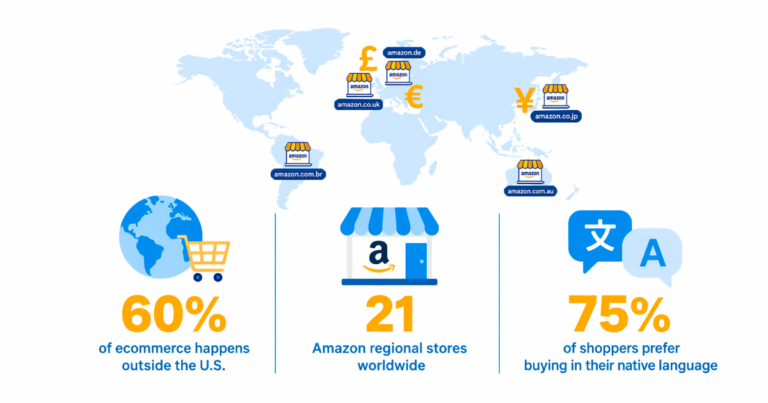

Most guides on how to become an Amazon affiliate stop at the US program and leave it there. That approach misses a meaningful share of revenue from the start. Amazon runs 20 independent affiliate-supported storefronts worldwide, and each one requires its own tracking ID. A UK visitor who clicks your Amazon.com link lands on the wrong store, in the wrong currency, and your US affiliate tag earns nothing on that click.
This guide walks through the sign-up process, explains how to connect your country-specific tracking IDs in Geniuslink for automatic localization, covers the fastest methods for converting legacy links, and outlines how to use Groups, Tags, and Notes for clean governance. It ends with a test-purchase checklist your team can repeat for every new program you add.
Before You Apply: What Amazon Requires
Amazon’s approval process is conditional. You need a live, publicly accessible platform with original content before applying, whether that is a website, blog, YouTube channel, or social media presence with an established following. The content must be regularly updated and compliant with Amazon’s policies. Private or paywalled platforms do not qualify.
The most important operational requirement is the three qualifying sales within 180 days rule. After conditional approval, your account is evaluated once you have referred three purchases from separate customers. If you do not reach this threshold within six months, the application will be withdrawn, and you will need to reapply. Plan your content calendar so you have product-focused posts live before you apply, not after.
Disclosure compliance is a program requirement, not optional. Every page, post, or video containing affiliate links must include a clear statement that you earn commissions from qualifying purchases. Amazon provides template language for this. The disclosure must appear before affiliate links are encountered by readers, not only in a footer. Build this into your site templates rather than treating it as a per-post task.
Amazon’s channel restrictions also limit where links can appear. Paid search campaigns and pop-ups are off limits under the program’s operating agreement. These are high-converting channels across most affiliate programs, so factor them into your traffic strategy rather than discovering them after the fact.
Joining the Right Amazon Associates Programs
Start with your analytics rather than assumptions. Check your existing traffic data to identify your top three source countries. Those are your first three programs to join. For English-language content with no prior data, Amazon.com (US), Amazon.co.uk (UK), Amazon.au (Australia), and Amazon.ca (Canada) account for the majority of English-speaking traffic and are the easiest to get approved for.
Each Amazon Associates program is country-specific and requires a separate application. Your Amazon.com tracking ID is not valid on Amazon.co.uk or any other regional store. Amazon operates 20 affiliate-supported storefronts across the Americas, Europe, the Middle East and North Africa (MENA), and the Asia-Pacific (APAC) regions, each with its own program, commission schedule, and payment setup.
The UK program is a practical starting point for European expansion. Once you are enrolled in Amazon.co.uk, joining the German, French, Italian, and Spanish programs requires only a few additional clicks rather than separate full applications. This makes the UK a logical second enrollment after the US for publishers with European traffic.
A few regional programs, including Japan, Brazil, Mexico, and the United Arab Emirates, require a local bank account to receive payments. If you have meaningful traffic from those regions, research payment options such as Payoneer before applying.
As you apply, track these details in a spreadsheet for each program:
- Country and store uniform resource locator (URL): amazon.com, amazon.co.uk, amazon.de, etc.
- Tracking ID assigned (for example, yoursite-20 for US)
- Email address used for the application
- Approval date
- Three-sale deadline (approval date plus 180 days)
Some applications are approved within minutes; others take one to two business days. You do not need all approvals before proceeding. Add tracking IDs to Geniuslink as you receive them, and your links will begin routing correctly for each region immediately.
Connecting Your Tracking IDs in Geniuslink for Automatic Localization
This is where the day-one global setup comes together. Sign in to your Geniuslink account, then navigate to Settings> Affiliate Programs. You will see a field for each Amazon storefront. Paste each tracking ID into its corresponding field: your US ID goes in the Amazon.com field, your UK ID in the Amazon.co.uk field, and so on.
Once saved, Geniuslink’s localization engine automatically detects each visitor’s country and routes them to their local Amazon storefront with the appropriate tracking ID applied. A UK visitor clicking any Geniuslink-managed link lands on Amazon.co.uk with your UK Associates tag. A Canadian visitor reaches Amazon.ca with your Canadian tag. No manual intervention is needed for any of this.
Geniuslink supports all 20 Amazon affiliate-supported storefronts. As you join additional programs over time, you add the new tracking IDs to the same settings page without changing any published links. The same short link you published on day one continues to work correctly as your program roster grows.
Geniuslink will also alert you via the dashboard when it detects meaningful click traffic from a country for which you have not yet enrolled in that regional program, helping you prioritize which programs to join next based on actual traffic patterns rather than assumptions.
Before creating links at scale, use the affiliation test button in your Geniuslink dashboard to verify that each tracking ID is correctly formatted and saved. This two-minute step prevents tracking failures that could cost commissions during the 180-day qualification window.
Six Methods for Building and Converting Links
Geniuslink’s affiliate linking methods cover every publishing context. Use whichever combination fits your workflow.
Dashboard Generator
Paste any Amazon product URL into the “Create New Link” field in your Geniuslink dashboard. The system generates a short geni.us link that routes globally based on visitor location. Assign it to a Group, add optional notes, and save. The process takes about 15 seconds per link and is the best starting point for individual product links.
Chrome Extension
Install the Geniuslink browser extension and create links without leaving the Amazon product page. Click the extension icon while browsing any supported retailer, and it generates a short link, copies it to your clipboard, and automatically saves it to your dashboard. This is the most efficient method for content creators who research products as they write.
WordPress Plugin
The Amazon Link Engine plugin for WordPress scans your entire site and converts every Amazon link, past and future, into a localized Geniuslink URL. Once installed and activated, it runs continuously. No manual editing of existing posts is required, which makes it particularly valuable for sites with large back catalogs.
JavaScript Snippet
For sites not built on WordPress, add Geniuslink’s JavaScript snippet to your site header. It converts supported retailer links on page load and works with any content management system (CMS) or static site generator. Configure it once, and it handles your entire site going forward.
YouTube Optimizer
Submit your channel URL to Geniuslink’s YouTube Optimizer. It scans all video descriptions, identifies Amazon links, and converts them to globally localized geni.us URLs. For video creators with an established library, this is the fastest way to retroactively add global earning capability across every published video without manually editing individual descriptions.
Mobile App
The Geniuslink Express mobile app lets you create links directly from your phone. Share any Amazon product page to the app, and it generates a short link instantly, which is useful for creators who spot products while mobile browsing or share deals in real time on social media.
Organizing Links with Groups, Tags, and Notes
Clean organization from the start prevents a messy library that becomes difficult to analyze as it grows. Geniuslink’s Groups, Tags, and Notes work together to keep your links structured and your reporting actionable.
Groups function like folders. Create one for each major channel or content category: Blog, YouTube, Email, Social Media, or by product category if that is more useful for your reporting. Assign every link to a Group when you create it. Groups enable channel-level performance analysis and let you apply different default tracking IDs per channel, so a YouTube Group can use a video-specific tracking ID while your Blog Group uses a separate one.
Tags add a second layer. Each link can carry multiple tags, applied by appending a tracking parameter to your link. Use tags for campaigns, seasonal periods, or traffic sources. For example, tagging links used during a promotional period with a consistent label gives you a clean, filterable data set when that period comes around again next year. Tags can also pass through to Google Analytics as UTM parameters, creating unified attribution across platforms.
Notes document context at the link level. Record what the link is for, which article contains it, why you chose a particular product, or any changes you have made to its destination. When you manage hundreds of links, notes prevent the “what was this for?” confusion that wastes time during audits and makes it straightforward to hand off link management to a team member.
A simple standard operating procedure (SOP) built around these three features can be summarized in one line for new team members: generate the Geniuslink URL first, assign it to the correct Group, add any relevant Tags, leave a Note if the context is not obvious, then publish.
Confirming Tracking with a Test Purchase
Before rolling out your global setup broadly, verify that the full tracking chain works end to end. Create a dedicated test link for an inexpensive product and add a unique tag, such as “SetupTest” so you can isolate this link in reports. Share the link with someone in another country, or simulate international traffic using a virtual private network (VPN) set to a country where you have enrolled in an Associates program.
Complete a test purchase through the link. The purchase should appear in your Amazon Associates dashboard within 24 to 48 hours. The click should register immediately in Geniuslink Insights. In your Insights report, confirm the following before declaring the setup complete:
- Did the click register from the correct country?
- Did it route to the expected Amazon storefront?
- Does the Group assignment match your intended configuration?
- Did the tag pass through correctly?
- Does the commission appear in the correct regional Associates account?
Common issues at this stage include ad blockers preventing affiliate cookie setting (test in an incognito window), and VPN exit nodes triggering Amazon security measures (residential IP addresses are more reliable for testing). If commissions do not appear after 72 hours, verify that your payment and tax information is fully completed in each regional Associates account, as incomplete tax details can delay or prevent commission payments.
Rolling Out Across Your Content Channels
With testing confirmed, start the full rollout from your highest-traffic content outward. Export your top-performing posts from analytics and prioritize those first. For WordPress sites with the Amazon Link Engine plugin installed, this conversion happens automatically. For other platforms, use your CMS’s search-and-replace function to systematically swap static Amazon links for Geniuslink URLs.
YouTube requires a separate pass. The YouTube Optimizer handles existing videos in bulk. For new videos, establish a publishing workflow: generate Geniuslink URLs for all products before the description is written, not as an afterthought. This ensures every new video launches with global tracking active.
Email templates, welcome sequences, and automated campaigns often contain legacy Amazon links that are easy to overlook. Search your email service provider for Amazon.com links in templates and update them. Most platforms support bulk find-and-replace across templates.
Social media bios, link-in-bio pages, and pinned posts are another common source of overlooked legacy links. Work through each platform methodically rather than relying on memory. A simple checklist of every platform where you have ever published Amazon links makes this audit systematic rather than approximate.
Monitoring Performance and Expanding Over Time
Once your setup is running, your Geniuslink analytics become your guide for expansion decisions. The Geography report shows which countries drive clicks and whether those clicks are converting. If you see a country sending consistent traffic but you have not yet enrolled in that regional program, Geniuslink will flag it. That is a clear next step in enrollment.
Sort links by earnings per click (EPC) rather than raw clicks to identify your true performers. A product link that converts infrequently but earns a high commission per conversion may deserve more prominent placement in your content than a high-click link with a low commission per sale.
Use the Link Health report regularly. Geniuslink monitors your Amazon product links for out-of-stock status and other destination issues, sending alerts before readers encounter dead ends. This is especially important during peak seasons when inventory changes quickly.
As your international traffic grows, revisit your program enrollment. The Americas, Europe, MENA, and APAC regions each have distinct programs. Joining programs in regions where you are sending traffic but not yet earning commissions is the most direct way to increase revenue from your existing audience without creating new content.
Try Geniuslink free for 14 days to connect your first tracking IDs and start earning globally from day one.
Author
Author