
The Modern Amazon Affiliate Revenue Challenge
Earning a meaningful income from Amazon Associates has become more challenging. Affiliate earnings per click vary widely by niche, but many Amazon Associates see EPCs in the $0.03–$0.10 range, meaning conversion optimization matters as much as traffic volume. Most affiliates leave significant revenue on the table because of issues that are entirely fixable.
Here’s what’s limiting your Amazon affiliate revenue right now:
- International traffic bounces: Your .com links send UK visitors to the wrong currency and shipping options
- Mobile friction destroys conversions: 60-70% of your traffic hits roadblocks on smartphones
- Single-retailer dependency: You’re missing 78% of shoppers who comparison shop before buying
- Low commission rates: Limited to Amazon’s 1-4%, when sellers would pay you 18%+
The good news? You can fix every one of these problems systematically. This guide shows you exactly how to 2-5× your Amazon affiliate earnings without driving more traffic. We’ll use real data from millions of clicks to prove what works.
Why Most Associates Earn Pennies per Click
Before we fix these problems, let’s understand why Amazon affiliate earnings stay low for most creators:
The 24-Hour Cookie Problem
Amazon’s affiliate cookie expires in just 24 hours. Compare that to other programs offering 30-90 day windows. If your visitor doesn’t buy immediately, you lose the commission.
Shrinking Commission Rates
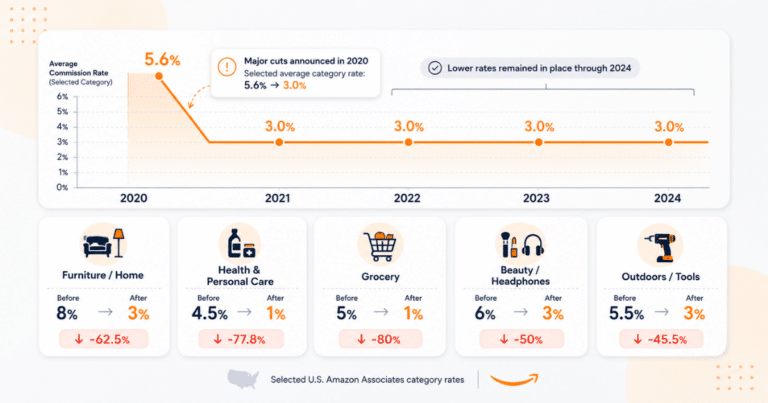
Amazon regularly updates commission rates. Categories that paid 8% now pay 3%. Video games dropped to 1%. Beauty products went from 6% to 3%. Each cut directly reduces your earnings per sale.
Geographic Revenue Loss
Amazon operates 22 country-specific stores. When you link to Amazon.com, visitors from Canada see USD prices and US shipping. Most bounce. For those who manually switch to Amazon.ca? Your affiliate tag isn’t being transferred, and your potential commission is lost.
Mobile User Experience Challenges
Click an Amazon link on mobile, and watch what happens: browser opens, user isn’t logged in, app store redirect, lost context, abandoned cart. Mobile accounts for 60-70% of traffic but converts poorly through standard affiliate links.
No Data-Driven Optimization
Most affiliates operate without clear visibility. They don’t know their true EPC (earnings per click) by country, can’t A/B test effectively, and have no visibility into mobile versus desktop performance. Without data, you can’t optimize.
Step 1: Audit Your Existing Amazon Affiliate Setup
You can’t improve what you don’t measure. Before implementing any changes, gather baseline metrics to understand your current performance gaps.
Start with these essential audits:
- Pull your Amazon Associates reports for the last 90 days
- Export your Google Analytics data for affiliate link clicks
- List your top 20 revenue-generating URLs
- Document which countries your traffic comes from
- Calculate your current EPC (earnings ÷ clicks)
Most affiliates discover significant gaps during this audit. Typical findings are 40-60% international traffic earning nothing, mobile conversion rates 3× lower than desktop, and EPCs below $0.10 across the board.
Metrics to Pull Before Optimizing
Critical baseline metrics you need:
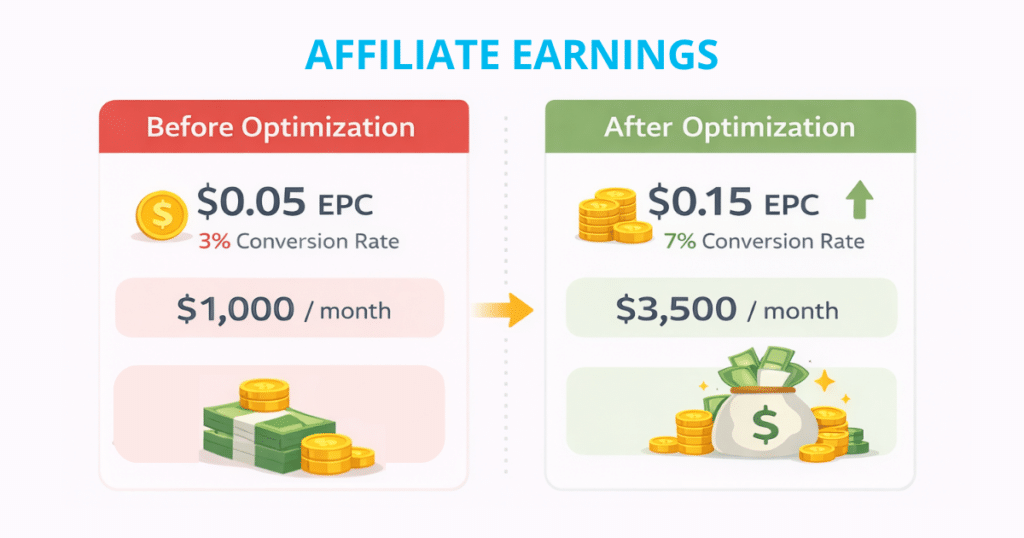
- Current EPC: Total earnings divided by total clicks (benchmark: $0.05)
- Conversion rate: Orders divided by clicks (benchmark: 4-8%)
- Geographic split: Percentage of traffic from each country
- Mobile versus desktop: Click distribution and conversion differences
- Top performers: Your 20 highest-earning URLs for testing
Step 2: Fix the Geo-Loss with Link Localization
If you’re using standard Amazon.com links, you’re losing international commissions. Localization automatically sends each visitor to their local Amazon store (UK visitors to .co.uk, Germans to .de, etc.) with your affiliate tag properly attached.
Localization fixes this instantly. One link works for all 22 Amazon stores worldwide. Japanese visitors see prices in yen on Amazon.co.jp. Germans see euros on Amazon.de. Everyone gets the correct language, currency, and shipping options. Most importantly, you earn commissions from every country.
How Geniuslink Auto-Localizes in One Click
Setting up localization with Geniuslink takes minutes:
- Add your Amazon affiliate IDs for each country program
- Create a Geniuslink (it’s automatically localized)
- Replace your old .com links with the new geni.us links
That’s it. No coding, no complex redirects. Every click now routes to the visitor’s local store with proper tracking. A visitor from France clicking your link lands on Amazon.fr with your French affiliate ID attached. You earn the commission when earning on qualifying purchases.
Revenue Impact and Real Data
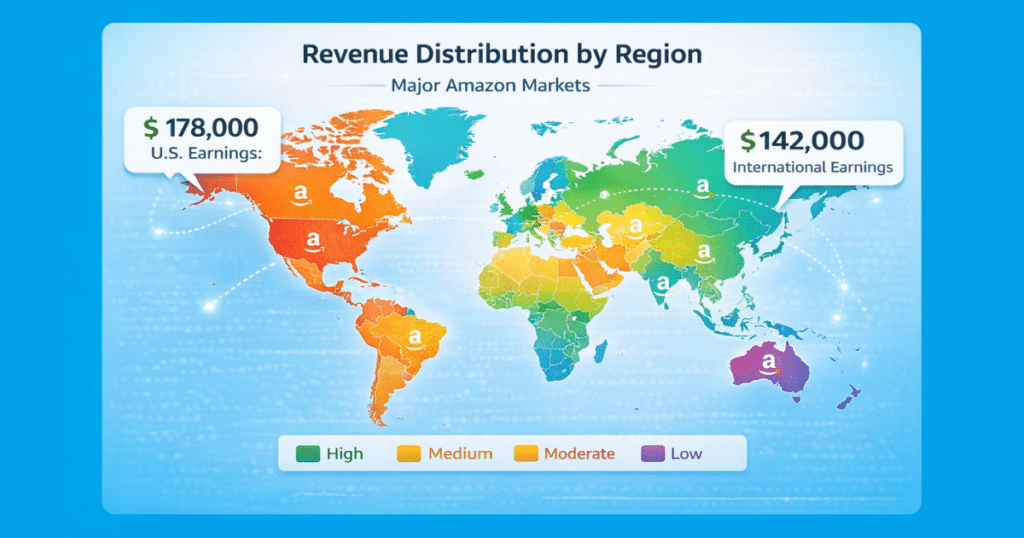
The numbers prove the value. Geniuslink analyzed over 2 million affiliate clicks and found:
- Total commissions: approximately $320,000
- US earnings (.com): approximately $178,000
- International earnings: approximately $142,000
That’s $142,000 in commissions that standard .com links would have missed entirely. Localization literally doubled these affiliates’ revenue by capturing international sales.
Implementation Checklist
Quick setup steps:
- Sign up for Amazon Associates in all major markets (UK, CA, DE, AU minimum)
- Add each country’s affiliate ID to your Geniuslink account
- Create localized links for your top 20 products
- Use Groups in Geniuslink to organize by site section
- Enable link health monitoring to catch dead products
- Test a few links manually from different countries via VPN (virtual private network)
Step 3: Plug the Mobile Gap with Deep Linking
Mobile traffic should be your goldmine: it represents 60-70% of clicks. Instead, it’s probably your biggest weak point. Standard Amazon links create a poor mobile experience that kills conversions.
Why 60-70% of Traffic Bounces on Mobile
Here’s what happens when someone clicks a standard Amazon link on their phone:
- Link opens in mobile browser (not the app)
- User isn’t logged in, sees login prompt
- The browser tries to redirect to the app store
- Context is lost, and the user gets frustrated
- They hit back and never completed the purchase
It’s a conversion killer. Your carefully crafted recommendation gets lost in technical friction.
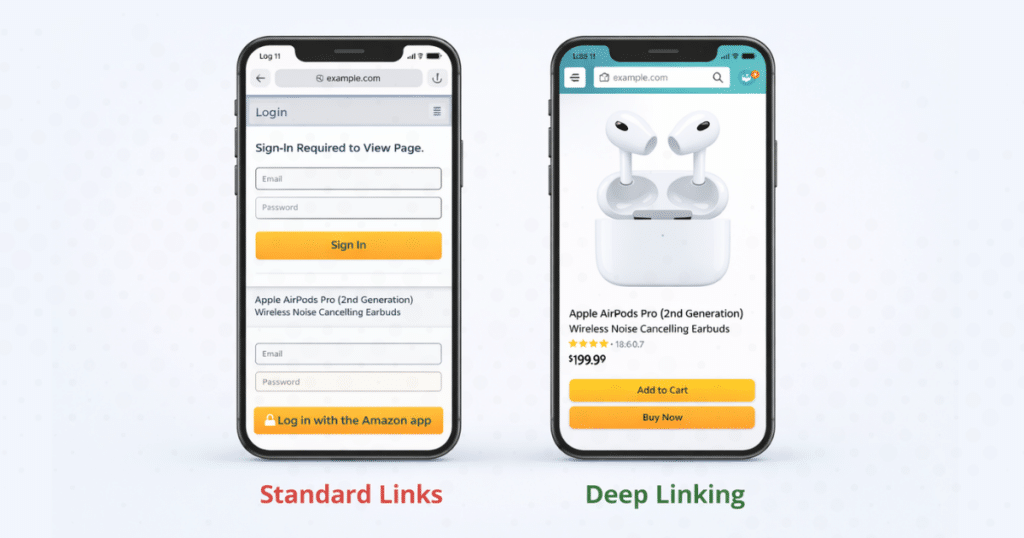
Deep Linking Results: 4.8× Earnings Lift
Mobile deep linking eliminates this friction. When enabled, your links open directly in the Amazon app (where users are already logged in) or a properly formatted mobile page.
Geniuslink’s A/B test results show:
- 4.5× more items shipped
- 7.9× higher conversion rate
- 5.7× more revenue generated
- 4.8× increase in affiliate earnings
Nearly 5× more earnings from the same traffic, just by fixing the mobile experience.
How to Enable Deep Links in Minutes
Activating deep linking is simple:
- Log in to your Geniuslink dashboard
- Navigate to your Amazon settings
- Toggle “Mobile Deep Linking” to ON
- All your links automatically update
No need to edit existing links. The change applies instantly to every geni.us link you’ve created. Mobile visitors now get a seamless path to purchase.
Step 4: Offer Shoppers Choice Pages to Boost EPC
Single-retailer links leave money on the table. An estimated 78% of online shoppers comparison shop before buying. When you only offer Amazon, you’re working against consumer behavior.
Consumer Behavior: 78% Comparison Shop
Choice Pages work with this behavior instead of against it. Rather than sending visitors to Amazon alone, you present 2-3 retailer options on a clean landing page. Shoppers pick their preferred store, and you earn commissions regardless of their choice.
This captures sales you’re currently losing. Some shoppers prefer a specific retailer’s customer service. Others have gift cards or loyalty rewards at their preferred retailer. By offering choices, you convert browsers who would have bounced from a single-retailer link.
Data Proof: 2-4× EPC and 9× Conversions
The results from Choice Page testing consistently exceed expectations:
YouTube Creator Tests:
- Average EPC increase: +123% (2.2x)
- Amazon conversion rate: 3× higher on average
- One creator saw a 9x conversion rate improvement
- Total revenue lifts of 200-400%
One affiliate reported her income increased by over 2.6x after implementing Choice Pages. Every major test shows dramatic improvement.
Designing a High-Converting Choice Page
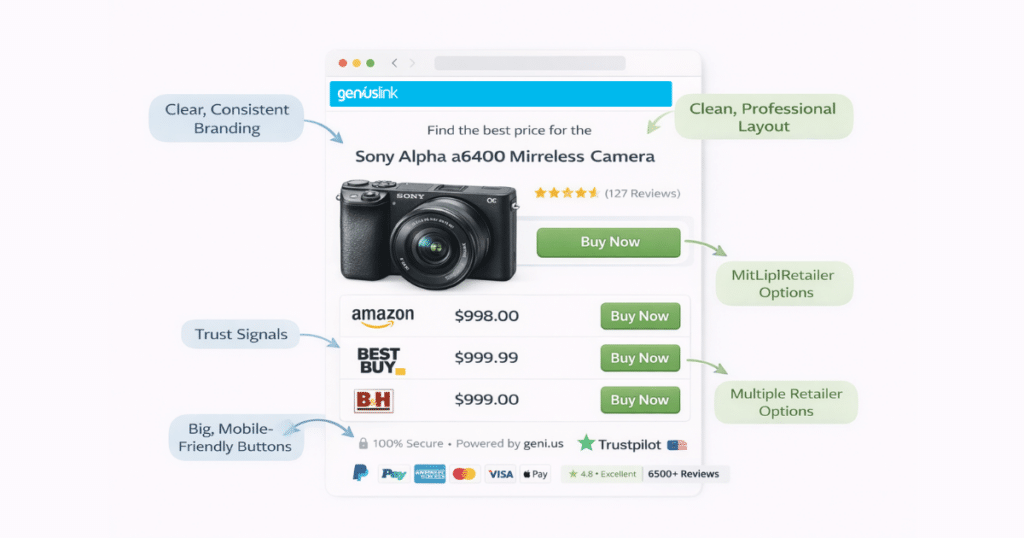
Elements of effective Choice Pages:
- Clean, fast-loading design: No clutter, just clear options
- 2-3 retailer options max: Amazon plus 1-2 alternatives
- Mobile-optimized layout: Big buttons, easy tapping
- Consistent branding: Match your site’s look and feel
- Localized options: Show relevant retailers by country
- Trust signals: Security badges, brief product info
Geniuslink’s Choice Page builder handles the technical complexity. You just pick retailers and customize the appearance.
Step 5: Unlock Higher Payouts with Seller Networks
Why settle for Amazon’s 1-4% commissions when sellers will pay you 18% or more? Seller networks like Levanta, Archer Affiliates, and PartnerBoost connect you directly with brands selling on Amazon.
The commission comparison is compelling:
- Amazon Associates: 1-4% typical (up to 10% rare categories)
- Seller Networks: 15-25% average (some up to 30%)
- Your increase: 4-17× higher commissions per sale
Plus, many seller programs operate on a 14-day attribution window instead of Amazon’s 24-hour window. More time means more conversions from considered purchases.
How it works with Geniuslink:
- Connect your seller network accounts in the dashboard
- Geniuslink automatically checks each click against seller catalogs
- Eligible products get the high-commission seller link
- Non-eligible products fall back to standard Amazon rates
- You earn the maximum available commission automatically when earning on qualifying purchases
This automatic optimization means every eligible click earns the highest available commission rate with no manual work.
Step 6: Centralize Link Management and Governance
Managing hundreds of affiliate links across multiple sites is a nightmare without proper systems. Geniuslink’s link management features bring order to chaos.
Groups, Tags, and Notes for Team Clarity
Groups organize links by logical categories:
- Site sections (Blog, Reviews, Comparisons)
- Product categories (Electronics, Home, Fashion)
- Campaigns (Black Friday, Summer Picks)
- Test variants (Control versus Choice Pages)
Tags add another layer of organization. With Amazon’s recent removal of order-level data from Associates Central, your own click-level tagging is now one of the few ways to connect traffic sources to earnings :
- Traffic sources (#email, #youtube, #organic)
- Content types (#review, #roundup, #tutorial)
- Performance tiers (#top10, #testing, #archive)
Notes provide context for each link:
- Why this specific product was chosen
- Which article or video contains the link
- Test parameters or special configurations
Real-Time Edits and Broken Link Alerts
Product sold out? Price changed? Destination URL broken? Fix it instantly without touching your published content.
Real-time link management means:
- Update destinations without changing your URLs
- Swap products during stockouts
- Add new seller network IDs retroactively
- Fix typos or errors immediately
Link health monitoring proactively alerts you to:
- Out-of-stock products
- Discontinued items
- 404 errors or redirects
- Price changes beyond thresholds
Analytics That Reveal Hidden Winners
Every Geniuslink click gets tracked with rich analytics:
- Geographic performance: EPC by country
- Device breakdown: Mobile versus desktop conversion
- Referrer analysis: Which content drives sales
- Time-based trends: Seasonal patterns, day-of-week effects
- Group and Tag comparisons: Test variant performance
This data reveals optimization opportunities invisible in Amazon’s basic reports.
Step 7: Run A/B Tests and Continuous Optimization
Stop guessing what works. Geniuslink’s built-in A/B testing lets you prove which strategies drive revenue.
Essential tests to run:
- Choice Page versus Direct Links: Split traffic 50/50 between options
- Different Choice Page Layouts: Test two versus three retailer options
- Seller Network Impact: Measure EPC lift from higher commissions
- Mobile Optimization: Deep linking on versus off performance
How to Set Up a 50/50 Test
- Clone your top-performing link
- Set one version to Amazon direct, one to Choice Page
- Enable 50/50 traffic split in link settings
- Tag each variant (#direct versus #choice)
- Run for 2-4 weeks minimum
- Compare EPC, conversion rate, and total revenue
Reading Results Correctly
Look beyond just EPC. A Choice Page might show slightly lower EPC but generate 2x total revenue due to higher conversion rates. Always consider both metrics when evaluating tests.
Quick-Win Checklist: 10 Things to Do This Week
Ready to boost your Amazon earnings? Here’s your action plan:
- Create a Geniuslink account (free 14-day trial available)
- Add your affiliate IDs for US, UK, CA, and DE Amazon programs, at a minimum. You’ll need to apply to each country’s program directly through Amazon.
- Confirm mobile deep linking is active in your settings (it’s enabled by default for Amazon links)
- Build your first Choice Page featuring Amazon + one alternative
- Convert your top 10 links to localized Geniuslink URLs
- Join Levanta or another seller network for higher commissions
- Set up Groups to organize links by site section
- Tag test links for tracking A/B performance
- Enable link health alerts for your money pages
- Run your first 50/50 split test on the highest-traffic link
Case Study Snapshot: 2.2× EPC in 30 Days
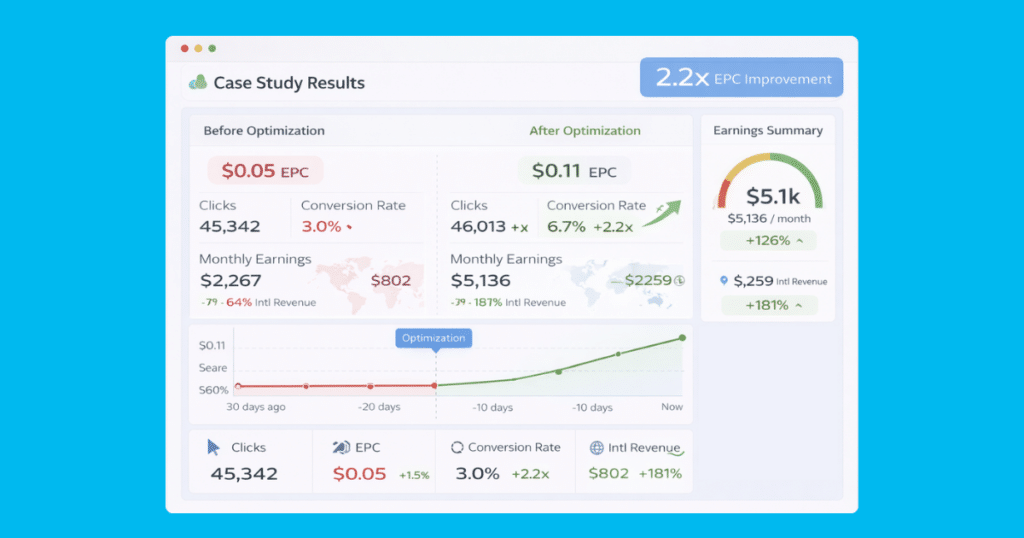
Let me share a concrete example of these tactics in action. A tech YouTuber with 150K subscribers implemented the complete optimization stack:
Starting metrics (before Geniuslink):
- Monthly clicks: approximately 50,000
- Average EPC: $0.04
- Conversion rate: 3.2%
- Monthly earnings: roughly $2,000
- International earnings: $0 (US-only links)
30 days after implementation:
- Monthly clicks: approximately 48,000 (slightly down)
- Average EPC: $0.09 (2.25x increase)
- Conversion rate: 7.1% (2.2x increase)
- Monthly earnings: approximately $4,320 (2.16x increase)
- International earnings: roughly $580 (all new revenue)
Key changes that drove results:
- Localization captured UK, CA, and DE commissions when earning on qualifying purchases
- Mobile deep linking fixed smartphone conversions
- Choice Pages featuring B&H and Best Buy doubled conversion
- Levanta integration boosted tech accessory commissions to 15%+
Biggest surprise: Choice Pages didn’t just increase conversion; they also raised average order value by 18% as shoppers felt more confident about their options.
Implementation Roadmap and Timeline
Transform your affiliate program systematically with this 4-week plan:
Week 1: Foundation and Setup
- Complete full link audit and baseline metrics
- Create a Geniuslink account and add all affiliate IDs
- Enable localization and deep linking
- Convert the top 20 links to Geniuslink URLs
- Join at least one seller network
Week 2: Deploy Core Optimizations
- Build Choice Pages for the top 5 products
- Implement the Groups and Tags organizational system
- Set up link health monitoring
- Replace the next 30 high-traffic links
- Test all mobile flows personally
Week 3: Launch Testing Program
- Start the first A/B test (Choice versus Direct)
- Create test variants with consistent tagging
- Monitor early performance indicators
- Fix any technical issues discovered
- Document test parameters in Notes
Week 4: Analyze and Scale Winners
- Review complete test data (need 1000+ clicks)
- Calculate EPC and revenue lifts
- Roll out winning variants site-wide
- Plan next round of tests
- Set up automated reporting
FAQs About Boosting Amazon Affiliate Revenue
Is Geniuslink compliant with Amazon’s Terms of Service?
Yes. Geniuslink works within Amazon’s affiliate program rules. It doesn’t cloak, stuff keywords, or manipulate cookies. It simply routes traffic intelligently while maintaining proper attribution.
Do Choice Pages hurt conversion rates?
The opposite. Testing consistently shows conversion rates 2-3x higher with Choice Pages. Shoppers appreciate options and buy more confidently when they can compare.
How much does Geniuslink cost?
Plans start at $6/month for up to 1,000 clicks, scaling with volume. Most affiliates see 10-50x ROI (return on investment). There’s a 14-day free trial to test results with your actual traffic.
Can I use these tactics with other affiliate programs?
Absolutely. While this guide focuses on Amazon, Geniuslink supports thousands of retailers and programs through its network integrations, including Walmart, Best Buy, and specialty merchants. The same localization, deep linking, and Choice Pages features work across all connected programs.
What if I only have US traffic?
You’ll still benefit from mobile deep linking (4.8x earnings lift), Choice Pages (2x EPC), and seller networks (4-17x commission rates). International traffic is just one revenue stream.
Conclusion and Next Steps
You now have a complete blueprint to multiply your Amazon affiliate earnings. The math is simple but powerful: fix geo-losses (2x), optimize mobile (4.8x), add choices (2x), and capture higher commissions (4-17x). These improvements compound.
An affiliate earning $1,000/month could hit $3,000-5,000/month by implementing this full stack. No extra traffic needed, just smarter monetization of existing clicks.
The key is starting today. Every day you wait means lost commissions. Pick one optimization from this guide and implement it this week. Measure the results. Then add the next optimization. Within 30 days, you’ll see transformative increases in your earnings when earning on qualifying purchases.
Thank you for reading this guide. The commission earned on qualifying purchases through the links in this article helps support this site and allows us to continue creating helpful content like this.