

Affiliate marketing drives revenue for content creators worldwide, but unclear disclosures and sloppy link management can damage the trust you’ve worked hard to build with your audience and, in some cases, create real legal and platform risk. The Federal Trade Commission (FTC) can fine publishers for inadequate disclosures, and Amazon can terminate your Associates account for non-compliance.
If you run a content site that depends on organic search, there’s an additional layer to consider: Google may issue manual penalties for affiliate links that pass PageRank without proper markup. For bloggers and SEO-driven publishers, that matters. For creators whose traffic comes from YouTube, social, or email, it’s largely irrelevant.
This guide covers both. We’ll walk through the disclosure requirements that apply to every affiliate marketer, then cover the technical SEO markup practices relevant to web publishers.
Yet the solution isn’t complex. By maintaining clear disclosures and using smart tools to manage your affiliate links, you can protect your program memberships and your audience’s trust. If you publish an SEO-driven blog or content site, implementing proper link attributes like rel=”nofollow” or rel=”sponsored” adds an additional layer of protection for your search rankings. This guide walks through exactly how to implement clean, compliant affiliate links that satisfy Google, the FTC, Amazon, and most importantly, your readers.
We’ll cover the technical implementation across different platforms, explain the legal requirements in plain English, and show how Geniuslink’s tools can simplify the entire process with branded short links and built-in compliance features. Whether you’re managing five affiliate links or five thousand, you’ll learn how to keep your markup clean, your disclosures clear, and your commissions flowing.
Google’s Stance on Paid Links
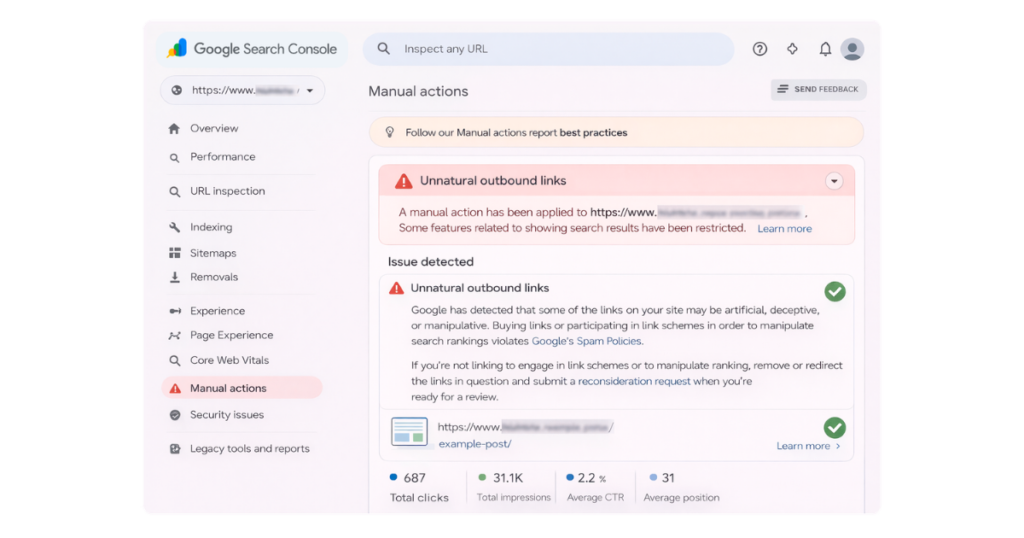
Google’s relationship with paid links has evolved significantly since the early days of PageRank. Originally, any link that passed PageRank helped boost the linked page’s search rankings. This created a significant market for buying and selling links purely for SEO value, which Google saw as manipulating their algorithm.
The search giant’s response was swift and clear. In their Search Central documentation, Google explicitly states that affiliate links should be qualified with rel=”sponsored” or, at a minimum rel=”nofollow”. This prevents those links from influencing search rankings while keeping them perfectly functional for users.
John Mueller, Google’s Search Advocate, has clarified this stance in webmaster hangouts and on social media. The message remains consistent: paid links, including affiliate links, should not pass PageRank. Failure to properly mark these links can result in manual actions against your site, potentially removing you from search results until the issue is resolved.
Google used to treat rel=”nofollow” and rel=”sponsored” as hard rules. If you marked a link, Google would simply ignore it, full stop. In 2019, they changed how this works. Instead of treating these attributes as commands, Google now treats them as hints. This means they factor them into their algorithm alongside other signals, but they’re not a guaranteed override.
For most publishers, this distinction doesn’t change what you should do. Think of it this way: a “hint” that you consistently ignore still gets noticed. If you’re a new creator, here’s what actually matters: Google still expects affiliate links to be marked with rel=”sponsored” or rel=”nofollow”, and sites that skip this step can still receive manual penalties (a human at Google reviews your site and removes it from search results). The shift from “directive” to “hint” was a technical change under the hood, not a green light to stop marking your links. The rule in practice is the same as it ever was: mark your paid links, every time.
Google’s link spam update further reinforced these requirements. The update specifically targeted sites that attempted to manipulate rankings through unnatural linking patterns, including unmarked affiliate links. Sites affected by this update may experience significant traffic impacts, with recovery potentially taking considerable time even after fixes are implemented.
The practical impact for web publishers focused on organic search is straightforward: outbound affiliate links on your site should carry proper rel attributes. This isn’t the highest-stakes compliance issue you face; that’s FTC disclosure, but for sites dependent on Google traffic, it’s worth getting right. If your primary channels are YouTube, social media, or email, this section is useful context but not something that affects your day-to-day compliance. This isn’t just about avoiding penalties; it’s about maintaining a healthy relationship with the search engine that likely drives the majority of your traffic. Google has made its expectations clear, and compliance is essential for sustainable affiliate marketing.
rel=”nofollow” vs. rel=”sponsored” vs. rel=”ugc”
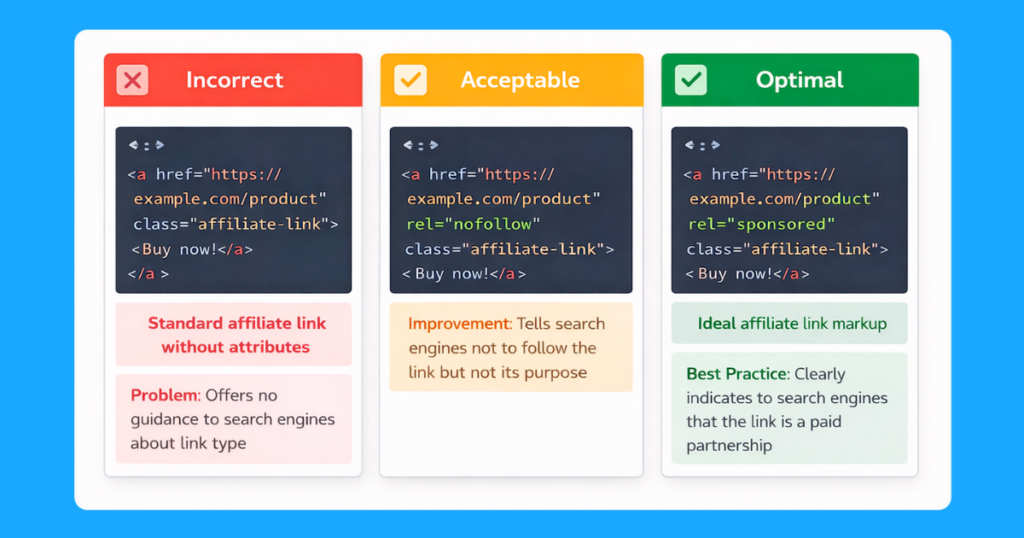
Understanding the differences between link attributes helps you implement them correctly. For years, affiliates had one option: rel=”nofollow”. This attribute told search engines not to follow the link or pass PageRank through it. Simple and effective.
Google’s update introduced two new values to provide more context about link relationships. rel=”sponsored” specifically identifies paid or sponsored links, including affiliate links. rel=”ugc” marks user-generated content like comments or forum posts.
For affiliate marketing, rel=”sponsored” is now the recommended attribute since all affiliate links involve some form of compensation. However, continuing to use rel=”nofollow” remains acceptable and won’t trigger penalties. Google treats both attributes similarly for ranking purposes.
Here’s how to implement each attribute in your HTML:
Using rel=”nofollow”:
<a href=”https://geni.us/YourProduct” rel=”nofollow”>Buy on Amazon</a> (paid link)
Using rel=”sponsored”:
<a href=”https://geni.us/YourProduct” rel=”sponsored”>Buy on Amazon</a> (paid link)
Using rel=”ugc”:
<a href=”https://example.com/user-recommendation” rel=”ugc”>User’s recommendation</a>
You can also combine attributes when appropriate. For instance, a sponsored link in user-generated content might use: rel=”sponsored ugc”. The order doesn’t matter, and Google will consider all provided hints.
Amazon explicitly confirmed that using rel=”sponsored” does not violate its Operating Agreement, addressing early concerns from Associates about the new attribute. This green light from Amazon reinforces that rel=”sponsored” is the forward-looking choice for affiliate links.
Internal vs. External Affiliate Links
A critical distinction that trips up many publishers: only external affiliate links need special attributes. Internal navigation on your site should flow PageRank normally to help search engines understand your site structure and content relationships.
John Mueller clarified this in statements confirming that internal links to pages containing sponsored content don’t require rel=”nofollow” or rel=”sponsored”. For example, if you link from your homepage to a product review page that contains affiliate links, that internal link should be a standard link without special attributes.
This makes logical sense. Internal links help Google crawl and understand your site. Adding nofollow to internal navigation would actively harm your SEO by preventing proper PageRank flow within your domain. The sponsored relationship only applies to the actual outbound affiliate links, not the internal paths users take to reach those pages.
Consider this practical example: You publish a roundup of the “10 Best Coffee Makers” containing affiliate links. When you link to this roundup from your site’s coffee category page, that internal link needs no special attributes. However, each outbound link within the roundup to Amazon, Williams Sonoma, or other retailers must include rel=”sponsored” or rel=”nofollow”.
This distinction simplifies site architecture and prevents accidental SEO damage from overuse of the nofollow attribute. Focus your compliance efforts on the actual affiliate links leaving your domain, not the internal navigation that helps users and search engines explore your content.
Legal Landscape: FTC, Amazon, and Global Disclosure Rules
Beyond Google’s requirements, affiliate marketers must navigate a complex web of legal obligations. The Federal Trade Commission (FTC) leads the charge in the United States with its “simple and clear” disclosure standard. This isn’t just guidance, it’s enforceable law with real financial penalties for violations.
The FTC requires that any “material connection” between you and a merchant be disclosed prominently. For affiliate marketing, this means readers must understand that you earn commissions before they click your links. The disclosure can’t be buried in fine print, hidden in footers, or require users to click “read more” to discover. It must be unavoidable and understandable.
Amazon specifies these requirements in the same spirit but in a different language in its Operating Agreement. Every page with Amazon links must include both a disclosure about earning commissions and specific language identifying you as an Amazon Associate. Amazon mandates this exact phrase: “As an Amazon Associate, I earn from qualifying purchases.” Deviating from this language or hiding it from users can result in account termination.
Amazon’s Creator University also provides the following guidance https://www.amazon.com/b?node=53643932011, “Transparency is a must, so you are required to disclose that you’re an Amazon Associate when you post links. Add something like “#ad” or #commissionsearned” to your post. It should be placed near your affiliate link or product review in a location that customers will notice easily. They shouldn’t have to hunt for it. Don’t put it after a long caption or make the text too small!”
The placement matters as much as the wording. Amazon explicitly states that disclosures must appear where readers don’t have to hunt for them. Best practice is to place disclosures either immediately before your first affiliate link or in a prominent banner at the top of your content. Social media posts require disclosures within the post itself, not just in your profile.
European regulations add another layer through the General Data Protection Regulation (GDPR) marketing requirements and country-specific advertising laws. The EU’s commercial practices regulations require clear identification of commercial content. Many European countries have additional requirements that mandate specific disclosure formatting.
Social platforms enforce their own disclosure policies. Instagram requires the use of their “Paid partnership” tag or clear hashtags like #ad or #affiliate within the post caption. TikTok provides a branded content toggle that must be activated for sponsored posts. YouTube requires disclosures both in the video description and through its built-in “includes paid promotion” checkbox.
The common thread across all these requirements: transparency. Regulators and platforms want consumers to understand when content includes commercial relationships. Meeting these requirements isn’t just about avoiding penalties; it’s about building trust with your audience by being honest about how you monetize your content.
Crafting Clear On-Page Disclosures
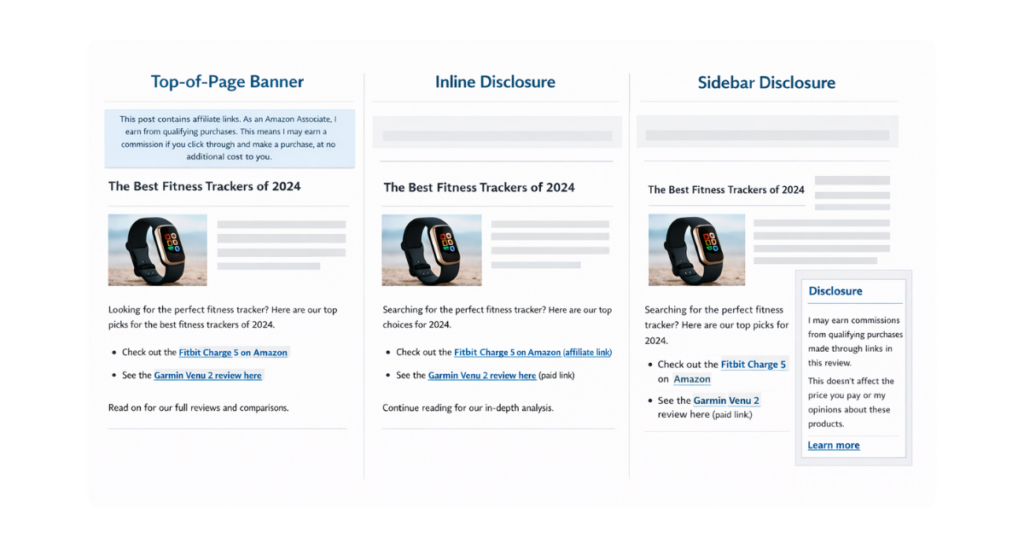
Effective disclosure combines legal compliance with user experience. The goal is to inform readers without disrupting their content consumption. Here are proven placement strategies and copy templates that satisfy regulations while maintaining readability.
Top-of-page banner approach: Place a highlighted box immediately after your introduction, before any affiliate links. This ensures every reader sees the disclosure without scrolling. Example copy: “This post contains affiliate links. As an Amazon Associate, I earn from qualifying purchases. This means I may earn a commission if you click through and make a purchase, at no additional cost to you.”
Inline labeling method: Add brief indicators directly next to each affiliate link. This works well for content with scattered product recommendations. Use parenthetical notes like “(paid link)” or “(affiliate link)” immediately after the linked text. This approach provides transparency exactly when readers need it.
Widget or sidebar disclosure: For sites with consistent affiliate content, a persistent disclosure widget can supplement (not replace) other methods. Position it prominently in your sidebar or as a floating element. This works best when combined with top-of-page or inline disclosures for maximum clarity.
Language matters as much as placement. Avoid vague terms like “monetary relationship” or “partnership” that readers might not understand. Be direct: you earn money when they make purchases through your links. Here are the tested disclosure templates:
For product reviews: “I may earn commissions from qualifying purchases made through links in this review. This doesn’t affect the price you pay or my opinions about these products.”
For gift guides: “This guide contains affiliate links marked with (paid link). I earn from qualifying purchases, which helps me create more helpful content like this.”
For comparison posts: “When you buy through our carefully selected links, we may earn a commission. Rest assured, this doesn’t influence which products we recommend. We only suggest items we genuinely believe will help you.”
Remember that disclosures must be readable on all devices. Test your disclosure formatting on mobile screens where most users consume content. Ensure sufficient contrast between text and background, use reasonable font sizes, and avoid placing disclosures where ads or pop-ups might obscure them.
Technical Implementation Across Content Management Systems
Implementing proper link attributes varies by platform, but modern content management systems (CMSs) make compliance straightforward. Here’s how to add rel=”sponsored” or rel=”nofollow” across popular platforms.
WordPress implementation: For manual control, switch to the HTML editor and add the attribute directly to your link code. However, plugins significantly streamline this process. ThirstyAffiliates, Pretty Links, and Lasso automatically add chosen attributes to all affiliate links. Configure the plugin once, and every future affiliate link includes proper markup.
To manually add attributes in WordPress: Click the link in your editor, select the pencil icon to edit, click the gear for link options, and toggle “Add rel=’nofollow’ to link” or add rel=”sponsored” in the HTML view. For bulk updates, plugins like Better Search Replace can update thousands of links simultaneously.
Shopify configuration: Shopify’s blog editor allows HTML editing for manual attribute addition. For product pages and automated content, you’ll need to modify your theme’s liquid templates. Add conditional logic to automatically append rel=”sponsored” to external links matching your affiliate patterns.
Many Shopify apps, such as Affiliatly and Refersion, handle attribution automatically for links they generate. Check your app settings to ensure proper attributes are enabled. For custom implementations, hire a Shopify Expert familiar with affiliate compliance to modify your theme correctly.
Ghost CMS setup: Ghost’s Markdown editor supports HTML, making adding attributes manually simple. For automation, Ghost’s routing layer allows you to inject attributes via JavaScript. Add a script to your theme that identifies external links and appends appropriate attributes on page load.
Custom site solutions: For sites using custom CMS platforms or static site generators, implement link-attribute logic at the template or build level. Create a link helper function that automatically adds rel=”sponsored” to links matching your affiliate URL patterns. This ensures consistency across all content without manual intervention.
Automation scripts can retrofit existing content. A simple JavaScript snippet can scan all external links on page load and add missing attributes. However, server-side implementation is preferable for SEO since search engines will see the attributes in the initial HTML.
Regular expression patterns help identify affiliate links programmatically. Match common affiliate network domains, tracking parameters, or your shortened link patterns. Then apply attributes consistently across your entire site. Document your patterns and automation rules for future maintenance.
Geniuslink for Short, Branded, Compliant Links
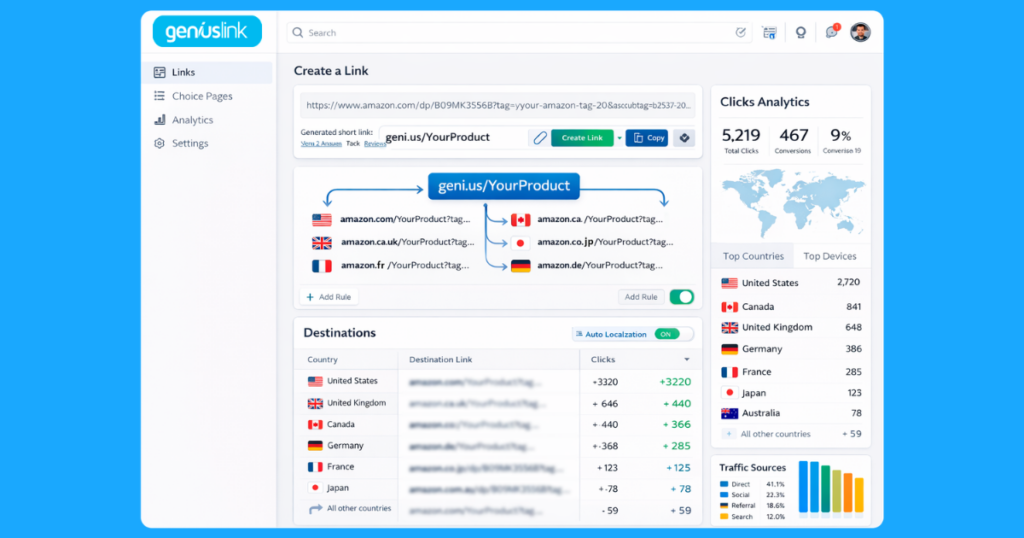
Managing dozens or hundreds of individual affiliate links quickly becomes unwieldy. Each link needs proper attributes, tracking codes must be maintained, and international audiences often land on the wrong regional storefronts. Geniuslink solves these challenges through intelligent link management that keeps your HTML clean while maximizing conversions.
Instead of cluttering your content with multiple long tracking URLs, Geniuslink provides short, memorable links like geni.us/YourProduct. One link in your content can intelligently route visitors to their local Amazon store, the right product variant, or even to a different retailer entirely. Your HTML stays simple with a single, properly attributed link.
The platform automatically handles the technical compliance requirements. When you create a Geniuslink, you simply add the rel=”sponsored” attribute to the clean short URL in your content. Behind the scenes, Geniuslink maintains all necessary tracking parameters, preserves referrer information, and ensures proper attribution across all supported retailers. You’re not “cloaking” links in any way that violates the terms of service. Instead, you’re simply making them shorter, cleaner, and more effective while maintaining full compliance.
Consider this transformation. Before Geniuslink, you might have:
<a href=”https://www.amazon.com/dp/B08N5WRWNW?tag=yourtag-20&linkCode=ogi&th=1&psc=1″ rel=”sponsored”>Echo (4th Gen)</a>
<a href=”https://www.amazon.co.uk/dp/B08N5WRWNW?tag=yourtaguk-21&linkCode=ogi&th=1&psc=1″ rel=”sponsored”>UK Link</a>
<a href=”https://www.amazon.ca/dp/B08N5WRWNW?tag=yourtagca-20&linkCode=ogi&th=1&psc=1″ rel=”sponsored”>Canada Link</a>
With Geniuslink, you simply use:
<a href=”https://geni.us/EchoSpeaker” rel=”sponsored”>Buy the Echo (4th Gen) on Amazon</a>
Behind that single link, Geniuslink automatically detects each visitor’s location and routes them to the appropriate regional store with your correct affiliate tags. This geo targeting happens without any additional code on your site, keeping pages fast and markup minimal.
Branded domains take this further. Instead of generic short links, use your own domain or memorable geni.us slugs that reinforce your brand. A link like geni.us/BestCoffeeMaker builds more trust than random character strings. Visitors recognize your brand in the URL, increasing click-through rates while maintaining compliance.
The platform also enables bulk link management. Update hundreds of links simultaneously when products change, affiliate programs update their terms, or you need to modify tracking parameters. This centralized control prevents broken links and ensures consistent compliance across all your content. Add Choice Pages to present multiple retailer options while keeping your code clean and compliant.
Best Practice Checklist & Quarterly Audit Framework
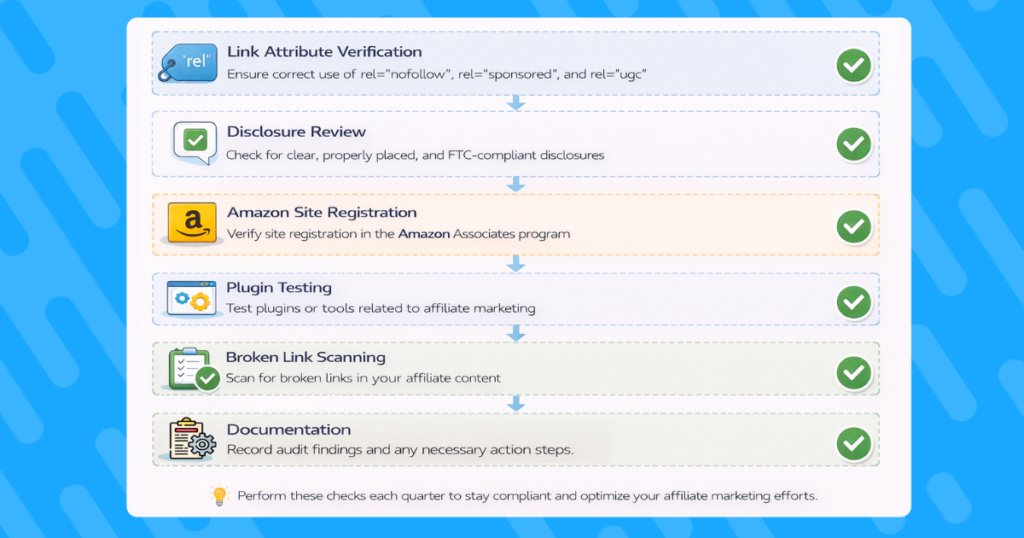
Maintaining compliance requires systematic verification. This checklist provides a repeatable audit process you can run quarterly to ensure your affiliate links remain properly formatted and disclosed.
Link attribute audit: Export all external links from your CMS or use a crawler tool. Verify each affiliate link includes rel=”sponsored” or rel=”nofollow”. Check that internal links to content pages don’t mistakenly include these attributes. Document any links missing proper markup for immediate correction.
Disclosure placement review: Visit your highest traffic affiliate content. Confirm disclosures appear before or alongside the first affiliate link. Test mobile and desktop views to ensure disclosures remain visible across devices. Screenshot disclosure placement for your compliance records.
Amazon site list verification: Log in to Amazon Associates and review your registered sites. Ensure all domains where you share links are listed, including “geni.us” if you use Geniuslink. Add any new domains or social media profiles you’ve started using since your last audit.
Plugin and automation check: Test your affiliate link plugins or scripts with new content. Create a test post with affiliate links and verify attributes are added automatically. Update plugin settings if needed and document your configuration for consistency.
Broken link scan: Run your entire site through a broken link checker. Affiliate programs occasionally change their URL structures or terminate partnerships. Replace dead links with working alternatives, or remove them entirely, to maintain the user experience.
Compliance documentation: Maintain a spreadsheet tracking your audit dates, findings, and corrections. This creates an audit trail demonstrating your good faith compliance efforts. Include screenshots of key pages showing proper disclosure placement.
Schedule these audits quarterly, ideally at the start of each business quarter. Set calendar reminders and allocate 2-3 hours for a thorough review. Regular audits catch issues before they compound and demonstrate your commitment to compliance if questions arise.
Common Mistakes That Trigger Penalties
Several recurring errors can trigger search engine penalties or account terminations. Understanding these pitfalls helps you avoid them entirely.
Link cloaking violations: Using JavaScript redirects, meta refreshes, or other techniques to hide the true destination of affiliate links violates most programs’ terms. While legitimate link shorteners like Geniuslink are allowed because they preserve referrer data, any attempt to mask or manipulate the click path risks account termination.
Hidden or insufficient disclosures: Placing disclosures in light gray text, using tiny fonts, or burying them below the fold fail the FTC’s requirements. Similarly, vague language like “some links may be affiliated” doesn’t meet the “clear and conspicuous” standard. Disclosures must be unavoidable and unambiguous.
Passing anchor text PageRank: Forgetting to add rel attributes to affiliate links allows them to influence search rankings, which Google explicitly prohibits. Even one missed attribute on a high-value anchor text could trigger manual review of your entire site.
Incentivizing clicks: Asking readers to “please use my links” or “click here to support the site” violates Amazon’s Operating Agreement and the terms of other programs. Focus on educating about products rather than explicitly driving clicks to earn commissions.
The Future of Affiliate Link Governance
Affiliate link requirements will likely become more stringent as regulators catch up with digital marketing practices. Artificial intelligence (AI) driven search engines are already getting better at detecting undisclosed commercial relationships, even without explicit rel attributes. Voice search and AI assistants may pose new challenges for disclosure as users increasingly interact with content in different formats.
Privacy regulations worldwide are expanding beyond data collection to cover all commercial relationships. More countries may follow a similar path by requiring explicit identification of commercial content. Platforms like TikTok and Instagram are already improving disclosure detection, flagging posts that appear commercial but lack proper tags.
Browser technology may eventually surface affiliate relationships directly to users. Features in development could highlight sponsored links differently or aggregate disclosure information at the browser level. Staying ahead means implementing clear, honest disclosure practices now rather than scrambling to comply later.
The trend toward transparency benefits ethical affiliate marketers. As disclosure requirements increase, compliant publishers will stand out from those cutting corners. Invest in proper link management infrastructure now to build sustainable affiliate revenue streams that survive regulatory changes.
Key Takeaways
Clean affiliate link markup and clear disclosures aren’t just compliance checkboxes, but they’re fundamental to sustainable affiliate marketing. By implementing rel=”sponsored” attributes, maintaining prominent disclosures, and leveraging tools like Geniuslink for streamlined management, you protect your search rankings while building reader trust.
Remember these key actions: Add rel=”sponsored” to all external affiliate links. Place disclosures prominently before readers encounter commercial links. Use Geniuslink’s short links and Choice Pages to simplify your HTML while automating compliance. Audit your implementation quarterly to catch issues early.
The investment in proper affiliate link management pays dividends through protected search rankings, maintained program memberships, and most importantly, reader trust. When your audience knows you’re transparent about commercial relationships, they’re more likely to value your recommendations and click your links.
Start implementing these practices today. Your future self and your commission statements will thank you.Ready to simplify your affiliate link compliance? Try Geniuslink free and transform messy tracking URLs into clean, branded links that automatically maintain proper attribution while routing users to the best destination for their location. Join thousands of affiliate marketers earning more on qualifying purchases with smarter link management.