

If you’re leaving money on the table with your affiliate links, you’re not alone. Most creators don’t realize that sending international traffic to the wrong Amazon store or forcing mobile users to use a clunky browser experience can slash conversion rates by 80% or more.
This glossary breaks down the essential affiliate marketing terms you need to know, highlighting their importance for anyone looking to succeed in the industry. We’ll cover exactly how to implement each one in Geniuslink, which KPIs they impact, and what results you can expect.
Whether you’re trying to capture more international sales, boost mobile conversions, or simply keep your internal link points from breaking, understanding these affiliate terms will help you optimize affiliate links like the pros do.
Mastering common affiliate marketing terms is crucial to success in the industry. Let’s dig in. This glossary serves as a resource for both beginners and experienced marketers to understand common affiliate marketing terms.
What Is This Affiliate Marketing Glossary For & Why the Right Vocabulary Matters
At its core, the affiliate marketing definition is simple: you promote products, shoppers buy through your links, and you earn affiliate commissions. Affiliate marketing is a form of performance marketing in which results are directly tied to actions such as sales or leads. But the execution? That’s where things get complex.
The affiliate industry has evolved from basic banner ads into a sophisticated e-commerce strategy with its own technical language. An affiliate marketer is someone who actively promotes offers and earns commissions based on performance. Terms like “localization,” “deep linking,” and “attribution” aren’t just jargon; they represent specific techniques that can double or triple your earnings when implemented correctly.
Consider this: global affiliate spend is massive and growing. The industry is worth over $20 Billion Annually as of 2024. At opposite ends of the spectrum, there are individual creators earning anywhere from beer money to seven figures. The difference between the two often comes down to understanding and implementing the right optimization strategies.
When you don’t speak the language, you miss opportunities. You might not realize that your international traffic is bouncing because they’re landing on Amazon.com instead of their local store. Or that mobile users are abandoning purchases because your links open in a browser where they’re not logged in. These seemingly small friction points compound into massive revenue losses over time.
That’s why mastering the vocabulary isn’t academic; it’s practical. Each term in this glossary represents a specific lever you can pull to increase conversions and earnings. Understanding them transforms affiliate marketing from guesswork into a systematic business. Joining an affiliate marketing forum can help marketers stay up to date on new terms and industry trends.
The Growth of Affiliate Marketing Programs
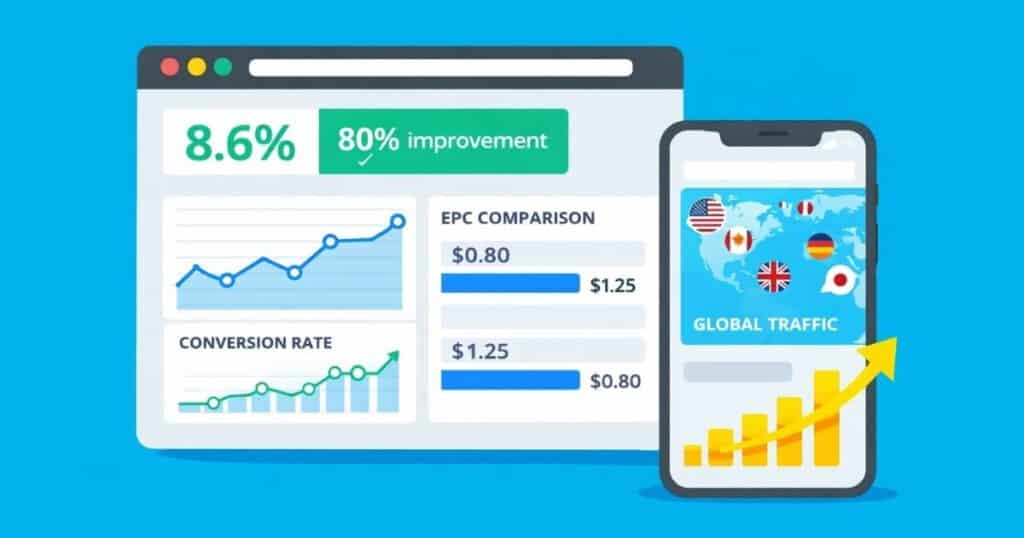
The numbers tell the story: affiliate industry statistics show that global affiliate spend is projected to reach $15.7 billion this year. That’s not a typo. We’re talking about a massive, mature industry that continues to expand.
The affiliate marketing industry encompasses a wide range of resources, including affiliate networks that serve as essential platforms connecting merchants and affiliates.
What’s driving these affiliate trends? Mobile commerce dominance, international market expansion, and increasingly sophisticated tracking capabilities.
Affiliate networks play a crucial role in connecting brands and affiliates within the industry, enabling seamless management of performance marketing campaigns. Creators who adapt to these shifts are seeing record earnings, while those using outdated tactics struggle to maintain revenue.
The global spend forecast indicates this growth isn’t slowing down. As more brands shift budgets from traditional advertising to performance-based marketing, the opportunity for savvy affiliates only increases. But capturing that opportunity requires understanding the tools and techniques that top performers use.
The Cost of Misunderstanding Key Terms
Let’s talk about what happens when you don’t optimize properly. Link optimization mistakes aren’t just minor inefficiencies. They can actually be revenue killers that compound over time.
Take international traffic. When a UK visitor clicks your Amazon.com link, they land on the US store with prices in dollars, products that might not ship to their country, and a checkout process in a foreign currency. Even if they really want the product, most will abandon the purchase. Failing to optimize your links means losing potential customers and the affiliate marketing commissions they could generate. That’s instant affiliate revenue loss.
Or consider broken affiliate links. Products go out of stock, pages move, and links die. Every broken link results in a 100% loss rate on those clicks, leading to missed affiliate marketing commissions and lost conversions. Multiply that across hundreds or thousands of links on your site, and you’re hemorrhaging potential commissions.
Mobile mistakes are equally costly. When smartphone users click from Instagram or TikTok and get bounced to a mobile browser where they need to log in again, conversion rates plummet. Poor mobile experiences can cause a potential customer to abandon their purchase, further reducing your affiliate marketing commissions. Mobile website traffic is dominant for most creators, making mobile optimization critical for survival.
The real cost isn’t just lost sales today. It’s the compounding effect of inefficiency over months and years, plus the opportunity cost of not reinvesting those earnings into growth. Understanding and implementing proper optimization is the difference between a hobby and a business.
How to Use This Essential Affiliate Marketing Glossary
This affiliate learning guide is designed for practical application, not theory. Each term includes four key components to help you implement immediately: Understanding essential affiliate marketing terms is the foundation for effective optimization.
- Clear definition of what the feature does and why it matters
- Configuration steps showing exactly where to set it up in Geniuslink
- KPI impact explaining which metrics improve and by how much
- Quick FAQ answering the most common implementation questions
Think of this as your Geniuslink tutorial and reference guide rolled into one. Bookmark it, refer back to it, and use it to audit your current setup. Most creators find at least 2-3 quick wins just by reviewing their existing links against these best practices.
Geniuslink Feature Glossary
Now, let’s dive into the specific Geniuslink features that can transform your affiliate tools arsenal. These features can be the difference between amateur and professional conversion rate optimization. Each feature below has been proven to increase EPC when properly implemented. These features support the management of affiliate programs and networks, and help affiliate managers optimize the advertising content they produce for better results.
Localization
Definition & Why It Matters
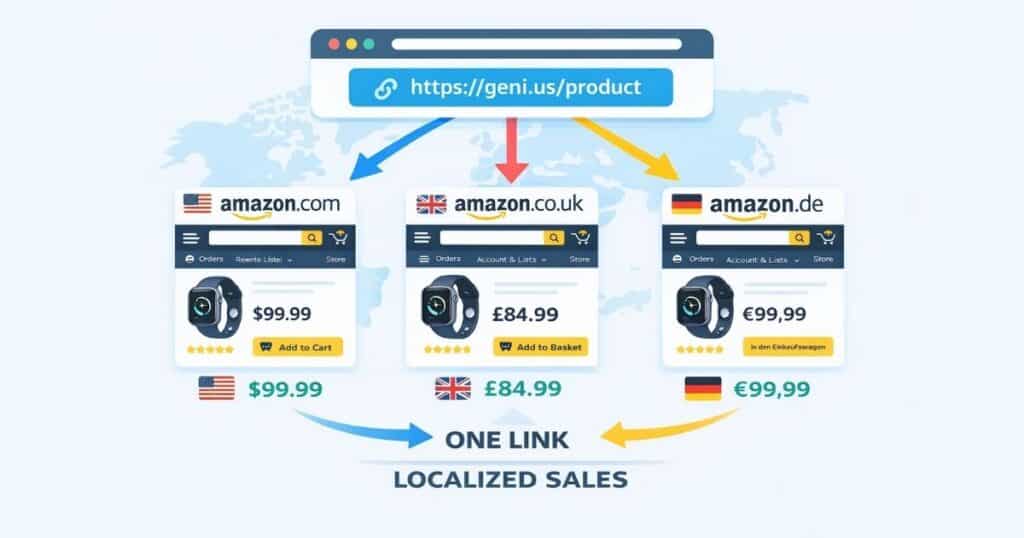
Amazon localization automatically sends each visitor to their local Amazon store with the right currency, language, and products. Without it, your UK visitors land on Amazon.com, see prices in dollars, and even if they can buy the products, they won’t choose to when they can buy from their local Amazon store and receive the product as fast as overnight. It’s like sending someone to a store in a foreign country where they don’t speak the language. Localization is a form of targeted marketing that ensures each potential customer is directed to the most relevant storefront.
Geniuslink localization solves this with geo-targeted links that detect visitors’ locations and route them to the correct Amazon storefront. A single geni.us link intelligently handles traffic from all countries, maximizing international affiliate sales that would otherwise be lost, and converting potential customers who might otherwise abandon the purchase.
The impact of link translation is immediate: shoppers see familiar currency, local shipping options, and products actually available in their market. This removes the friction that kills international conversions.
How to Configure Localization in Geniuslink
Setup is refreshingly simple. Localization is automatic. After creating your Geniuslink account, navigate to your Affiliate Settings and add your Amazon tracking IDs for each marketplace (US, UK, Canada, etc.) you expect traffic from, and that’s it.
Every Amazon link you create through Geniuslink will route visitors to their local store. No coding, no complex rules, no maintenance. The platform handles product matching across stores and maintains your tracking. Each localized link includes the correct Affiliate ID for each store you have added, using a unique tracking URL to monitor performance and attribute clicks correctly.
Unlike Amazon’s OneLink (which works only for Amazon.com links to select countries), Geniuslink accepts links from any Amazon store and translates them to any of the 20+ Amazon marketplaces worldwide. Geniuslink enables global localization for Amazon links. Rather than being confined to specific regional redirects like Amazon’s OneLink, we support links from all Amazon stores and reliably localize them to over 20 Amazon marketplaces, ensuring your international audience finds the correct product in their native store every time.
KPI Impact & Benchmarks
Localization primarily impacts conversion rate and earnings per click (EPC). Sending shoppers to their local store with familiar currency and shipping options dramatically improves checkout completion rates.
In practice, affiliates report that proper localization can capture 20-40% additional revenue from international traffic that was previously bouncing. Some niches with heavy international audiences see even higher lifts.
The key metric to watch: international conversion rate. Monitoring click-through rate alongside conversion rate provides a more complete picture of localization effectiveness. Before localization, international visitors might convert at a rate of 0.5%. After that, that often jumps to match or exceed your domestic conversion rate.
Quick FAQ
Q: Does Geniuslink support all Amazon storefronts?
A: Yes, Geniuslink covers all 20+ Amazon marketplaces except Turkey, automatically translating between any combination of stores.
Q: Will localization boost my conversion?
A: Absolutely. Studies show that 76% of shoppers prefer to buy in their local currency and language. Localization removes the friction that prevents international sales.
Q: Is this the same as Amazon OneLink?
A: Similar goal but far more powerful. OneLink only works for Amazon.com links and covers fewer countries. Geniuslink supports any Amazon link from any store and offers advanced features like country-specific overrides.
Learn more: Geniuslink Localization Guide
Mobile Deep Linking
Definition & Shopper Journey
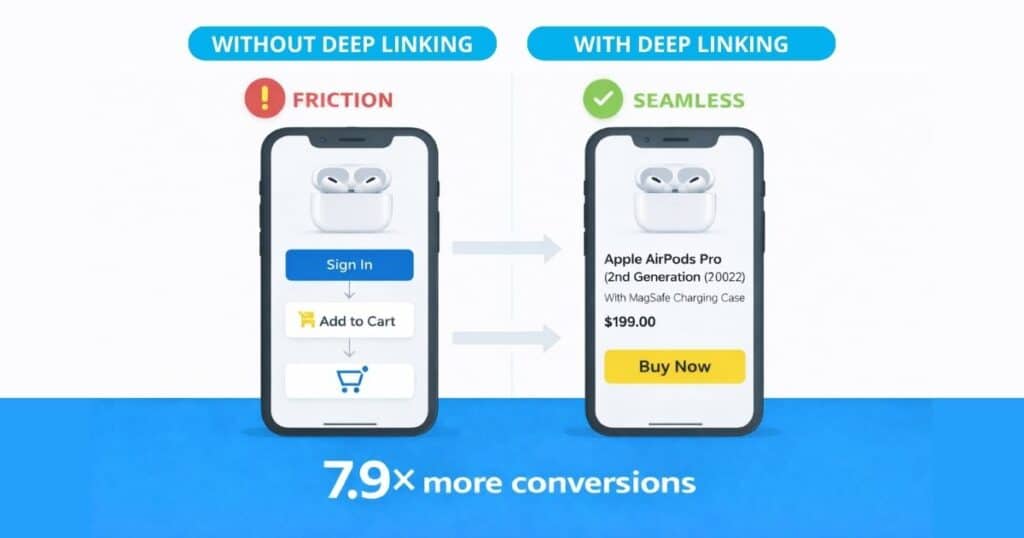
Mobile deep linking in the Amazon app means sending mobile users directly into the Amazon shopping app rather than a mobile browser. This matters because the typical mobile journey is broken: the user sees your product on Instagram, clicks the link, which opens in Instagram’s built-in browser where they’re not logging in, so they either have to sign in or, more often, give up.
With deep linking, that same click opens straight in the Amazon app where they’re already logged in, have saved payment methods, and can buy with one tap. Tracking a user’s identification code enables accurate conversion attribution across devices, ensuring user actions are properly monitored and analyzed.
This mobile shopping optimization is critical because mobile traffic dominates for most affiliates, especially those on social media. Every mobile click without deep linking is a battle uphill for conversion. Amazon has spent millions improving the customer journey, so opening the app ensures you benefit from all their hard work and innovations.
Set Up Steps in Geniuslink
The beautiful thing about Geniuslink’s mobile deep linking is that it’s automatic. Every Amazon link you create includes built-in deep-linking logic. No special syntax, no extra configuration, no affiliate links to maintain.
Just create your links as normal in the Geniuslink dashboard. The platform detects mobile users and attempts to open the Amazon app. If the app isn’t installed, it gracefully opens the device’s default browser with your tracking intact.
Note that certain products (like Kindle books) can’t be purchased in-app due to platform restrictions. Geniuslink intelligently disables deep linking for these products to ensure the best user experience.
KPI Impact & Case Study Data
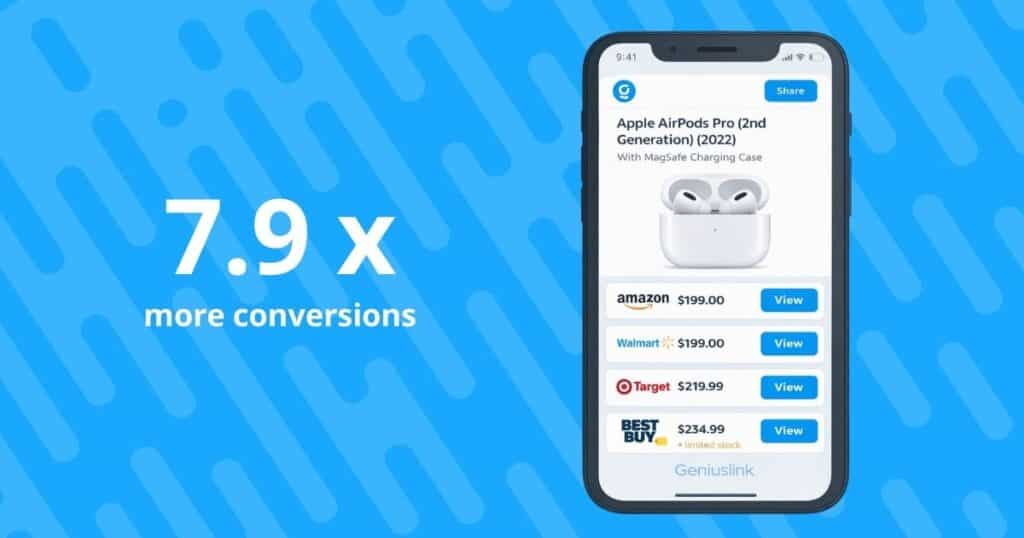
The numbers here are staggering. Geniuslink’s A/B tests show deep linking delivers 7.9× more conversions and 4.8× higher earnings compared to standard mobile links. That’s not a marginal improvement, it’s a complete transformation of mobile performance.
These gains come from removing friction at the critical moment of purchase. Mobile affiliate conversions jump because users can complete purchases instantly without authentication hurdles or payment re-entry.
Watch your mobile conversion rate closely. Most affiliates see it jump from 1-2% to 5-10% or higher with proper deep linking, directly multiplying mobile EPC. Page optimization for mobile devices further enhances the effectiveness of deep linking by ensuring on-page SEO factors, such as keyword placement, meta tags, and HTML code, are fully optimized for conversions.
Quick FAQ
Q: What if a user doesn’t have the Amazon app installed?
A: Geniuslink automatically falls back to the default web browser.. The user still reaches the product via your affiliate tracking, and you don’t lose the sale.
Q: Do all products deep-link?
A: Physical products do. Digital items like Kindle books and apps can’t be purchased in the Amazon app due to platform policies, so Geniuslink sends these to the mobile web.
Q: Does deep linking work on desktop?
A: No, it’s specifically for mobile apps. Desktop users get the standard web experience, which is already optimized for desktop conversion.
Learn more: Mobile Deep Linking Setup
Choice Pages
Definition & Shopper Psychology
A Choice Page is a clean, mobile-optimized product comparison page that displays a single product across multiple retailers. Instead of forcing visitors to Amazon only, you present options: Amazon, Walmart, Target, Best Buy, wherever they prefer to shop.
This taps into fundamental shopping behavior: 78% of consumers comparison shop before buying. Choice Pages are a targeted marketing strategy that presents options tailored to shoppers’ preferences, increasing engagement and conversion rates. When you only offer one retailer, you’re fighting this instinct. Choice Pages work with it, keeping shoppers in your ecosystem instead of losing them to deal aggregator sites.
These multi-retailer links also diversify your income streams. If Amazon changes commission rates or has stock issues, you still earn from other retailers. It’s both a conversion booster and a business hedge.
Creating a Choice Page in 60 Seconds
In your Geniuslink dashboard, click “Create Choice Page” and paste any product link. The platform automatically pulls the product title, image, and price. Then it suggests matching products at other retailers, just toggle on the ones you want to include.
No design skills needed. Geniuslink provides clean, tested templates that look professional on any device. Your affiliate accounts for each retailer are connected behind the scenes, so commissions flow correctly regardless of where shoppers buy. Each retailer option uses a unique affiliate’s link to track conversions and attribute sales or leads to the correct affiliate.
Once published, you get a single geni.us link to share anywhere. The page includes all required FTC disclosures and retailer compliance language, keeping you safe while maximizing choice page earnings.
KPI Impact & Real-World Results
Choice Pages deliver multiplicative returns. Testing shows they generate 2.6× the affiliate income of single-retailer links. Some affiliates report even higher multiples, especially in competitive categories where price and availability vary.
The magic happens through two mechanisms: higher conversion (shoppers buy from their preferred store) and better margins (you capture sales from higher-commission retailers when available). Together, these result in a dramatically higher EPC.
Track both your overall conversion rate and your revenue mix by retailer. Many affiliate programs use revenue-sharing models to compensate affiliates for sales generated through Choice Pages. You’ll often find surprising insights about where your audience actually prefers to shop.
Quick FAQ
Q: Can Choice Pages include non-Amazon retailers?
A: Yes! Include any major retailer with which you have an affiliate relationship. Geniuslink supports direct programs like Walmart and Target and aggregators like Skimlinks.
Q: Are Choice Pages mobile-friendly?
A: Built for mobile first. Templates are responsive, fast-loading, and optimized for thumb-friendly mobile shopping.
Q: Do Choice Pages handle disclosures and compliance?
A: Yes. Each page includes required FTC affiliate disclosures and retailer-specific compliance language. Since they’re hosted by Geniuslink (not on retailer sites), you can even use them in emails and books where direct affiliate links are prohibited.
Learn more: Choice Pages Guide
Link Health
Definition & Risk of Link Rot
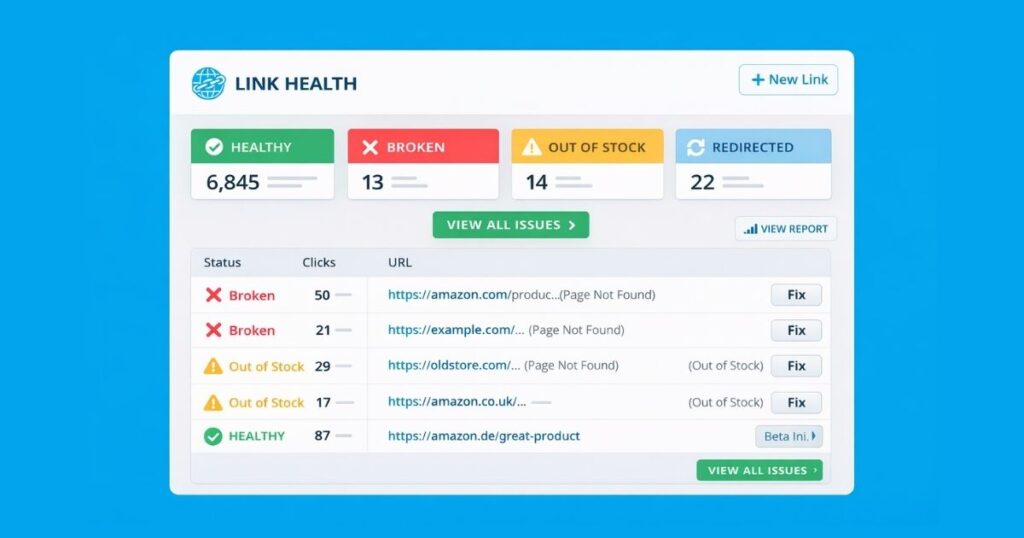
Link health tracks whether your affiliate links actually work. Broken affiliate links from out-of-stock products, moved pages, or expired deals guarantee zero conversions. Broken links also negatively impact the usability and effectiveness of your web pages, making it harder for users to engage or convert. It’s like having a store with its doors locked. No amount of traffic helps if customers can’t get in.
Link rot accelerates over time. Products disappear, URLs change, and before you know it, 10-20% of your links could be dead. Each broken link represents 100% lost revenue on those clicks.
Geniuslink’s link health report continuously monitors your links, flagging issues before they cost you money. It’s an affiliate-quality assurance program that runs on autopilot.
Running Link Health Checks in Geniuslink
Navigate to Link Management in your dashboard to access the Link Health tools. The system automatically scans all your geni.us links against retailer APIs to check for availability, proper routing, and valid affiliate tracking. The tool also checks website owners’ URLs for errors or redirects, ensuring that all linked web pages are accessible and properly indexed.
When issues surface, you’ll see them flagged, ready to fix. Out of stock at Amazon? Geniuslink can route to alternate retailers. Just log in to your dashboard and update the link. Page moved? Update once in Geniuslink, and every instance updates automatically.
Set up notifications to alert you of critical issues. This proactive monitoring means you fix problems in minutes instead of losing revenue for months.
KPI Impact & Best Practices
Fixing broken links directly improves conversion rate and EPC. Every dead link repaired restores your conversion rate to its normal level. On sites with hundreds of links, or content with 1,000s of views, this maintenance can recover thousands in lost revenue.
Best practice: Check link health monthly at a minimum, weekly during high seasons, and daily during sales events like Amazon Prime Day and Amazon Prime Big Deals Day. Pay special attention after major retailer updates or category changes. Use Geniuslink’s bulk tools to fix common issues across multiple links simultaneously.
The compound effect is powerful. Maintaining link health preserves the value of your existing content and traffic, maximizing return on every piece you’ve created. Regular link health checks are essential for the success of any existing marketing campaign.
Quick FAQ
Q: How often should I check link health?
A: Monthly for most sites, weekly during peak seasons, daily during Amazon sales events. Set up Geniuslink’s automated alerts to catch critical issues immediately.
Q: Can Geniuslink fix broken links automatically?
A: Yes. Configure fallback options, such as routing to search results or to alternate retailers when products are unavailable. This captures sales that would otherwise be lost.
Q: Why is link health so important?
A: Every broken link = 0% conversion rate. Maintaining link health preserves your earnings potential across all existing content.
Learn more: Link Management Tools
Seller Networks (Amazon Seller Affiliate Programs)
Definition & How They Differ from Amazon Associates
Amazon seller networks like Levanta, Archer, and PartnerBoost connect you directly with brands selling on Amazon. Instead of Amazon’s standard rates (typically 1-10%), sellers pay from their marketing budgets, often 15-30% or higher.
These programs use Amazon’s Attribution API to track sales while staying compliant. The key difference: higher affiliate payouts (2-17× standard rates) and longer cookie windows (14 days vs 24 hours). In these programs, the advertiser pays higher commissions directly to affiliates, reflecting a pay-for-performance model.
Think of it as getting VIP commission rates on products you’re already promoting. Same Amazon, same user experience, just significantly more money in your pocket.
Connecting Seller Networks in Geniuslink
First, sign up with seller networks (most are free). Then, in Geniuslink’s Affiliate Settings, connect each network account. Geniuslink acts as affiliate software, managing tracking, reporting, and link management for seller networks. The platform automatically checks every click to see if higher seller commissions are available.
No special links needed: your existing Amazon links trigger seller commissions when applicable. Geniuslink handles the complex routing, ensuring you get the highest available rate while staying compliant with all program terms.
You can even stack multiple networks. Geniuslink checks each one in priority order, maximizing your earnings opportunity on every click. Geniuslink processes each click through a waterfall function of your preferred affiliate networks. It attempts the highest-priority network first and proceeds sequentially down the list until a match is found, thereby maximizing the earning opportunity on every single click.
KPI Impact & Earnings Examples
Seller networks dramatically increase EPC through higher commission rates. Affiliates benefit from increased affiliate marketing commissions when using seller networks, as higher rates directly boost their earnings. Levanta’s average bonus rate is 18.5%, compared to Amazon’s typical 4%; that’s a 4.6× earnings multiplier on those sales.
The 14-day cookie window also captures more sales. Standard Amazon cookies expire in 24 hours, but seller cookies last two weeks. This catches purchases from shoppers who research now but buy later.
Real example: A fitness affiliate promoting supplements at Amazon’s 1% rate switched to seller networks averaging 20%. Same traffic, same conversions, but 20× the commission per sale.
Quick FAQ
Q: Are seller networks part of Amazon Associates?
A: No, they’re separate programs using Amazon Attribution. Commissions are paid directly by sellers, not by Amazon.
Q: Do I need different links for seller deals?
A: No! Once you’ve added one or more seller networks, Geniuslink automatically applies seller commissions when available. Use your normal links; the platform handles everything behind the scenes.
Q: Is the commission really higher?
A: Yes. Sellers pay premium rates to incentivize promotion. Average rates are 2-17× higher than standard Amazon commissions, with 14-day cookies vs. 24-hour cookies.
Learn more: Seller Networks Setup
Groups & Tags
Definition & Use Cases
Geniuslink groups can be used to organize your links into logical buckets. For example:
- by website
- by a social media platform
- by campaign
- by traffic source
- by client
- or by any system that makes sense for your business.
Each group can have its own affiliate IDs and settings, enabling precise tracking without complex spreadsheets.
Campaign tags add another layer via URL parameters. Append ?track=EMAIL_CAMPAIGN to any link for granular analytics. Together, groups and tags give you an affiliate link organization that scales.
Use cases: Separate tracking for different websites, isolate social media performance, test new traffic sources, comply with program requirements for distinct tracking IDs, or organize links by his or her own marketing channels, such as blogs, YouTube, or email.
Setting Up Groups, Overrides & Tags
In your Geniuslink dashboard, navigate to Groups and create logical buckets (e.g., “Main Site,” “YouTube,” “Email”). Drag links into appropriate groups or assign during creation. Geniuslink can also integrate with other tools via an API (Application Programming Interface), allowing automated link management and streamlined workflows.
Under Affiliate Settings, configure tracking overrides per group. This means your YouTube group can use different Amazon tags than your blog, keeping analytics clean and enabling platform-specific optimization.
Tags are even simpler: add ?track=YOUR_TAG to any geni.us link. These flow through to your analytics, enabling campaign-level tracking without touching link settings.
Analytics & Optimization Insights
Groups and tags transform vague traffic data into actionable insights. Instead of seeing aggregate performance, you can pinpoint exactly which channels, campaigns, or content types drive results.
This granular view enables optimization. Discover that Pinterest drives 3× the EPC of Twitter? Shift effort accordingly. Find that certain content types consistently underperform? Adjust strategy or cut losses.
The real power comes from testing. Use groups to A/B-test different approaches while keeping data clean and separate. Analyzing keyword sentences relevant to each group can further enhance optimization efforts by identifying which phrases drive the best results.
Quick FAQ
Q: How many groups can I create?
A: Unlimited. Create as many as needed for clean organization and tracking. Most affiliates use 5-10 core groups.
Q: Can a link belong to multiple groups?
A: No, each link lives in one group for clarity. You can move links between groups at any time.
Q: What are affiliate overrides?
A: Different tracking IDs per group. Your Instagram group might use the tag “INSTA-20” while your blog uses “BLOG-20”, enabling platform-specific analytics in Amazon and other programs.
A/B Split Testing
Definition & Experiment Design
A/B testing affiliate links means sending portions of your traffic to different destinations to see which converts better. Send 50% to Amazon and 50% to Walmart. Or test a Choice Page against a direct link. Real data beats guesswork every time.
Geniuslink AB routing handles the split within a single link. No need for separate URLs or complex tracking. This feature leverages advanced advertising technology to optimize campaign performance. The platform randomly assigns visitors according to your specified percentages.
This scientific approach to split-testing EPCs reveals optimization opportunities you’d never find through intuition alone.
Building an A/B Test Link in Geniuslink
Create an A/B test link by specifying your control and variant destinations, along with the traffic split (e.g., 70/30). Geniuslink randomly routes each click according to these percentages.
For advanced testing, embed A/B splits within geo-targeting rules. Test Amazon vs Walmart for US traffic only, while sending everyone else to your standard Choice Page. This surgical approach yields cleaner results.
Let tests run until you achieve statistical significance, usually a minimum of a few hundred clicks per variant. Geniuslink tracks performance by branch, making winner identification straightforward. Integrating with data management platforms can provide deeper insights into test results by organizing and analyzing consumer data for more effective marketing campaigns.
Measuring Results & Scaling Winners
Monitor three key metrics per variant: clicks, conversion rate, and EPC. The winner is usually obvious as one variant will show notably higher conversion and earnings.
Once identified, switch all traffic to the winning approach. But don’t stop there. Use your learnings to design the next test. Continuous optimization compounds into dramatic long-term gains.
Document your tests and results. Patterns emerge over time that inform broader strategy beyond individual link optimization. A/B testing can also help identify sources of low-quality traffic, allowing you to filter them out and improve overall campaign ROI.
Quick FAQ
Q: What can I test with A/B routing?
A: Everything. Different retailers, direct links vs Choice Pages, product variations, and landing sales pages. If it has a URL, you can test it.
Q: How do I run a valid test?
A: Change one variable at a time, use a sufficient sample size, and run tests during normal traffic periods. Geniuslink’s random splitting ensures clean data.
Q: Can I target tests to certain countries?
A: Yes. Combine A/B testing with geo-targeting rules to test different approaches by market. Essential for international optimization.
Putting It All Together: An Affiliate Program Workflow for Higher EPC
Here’s your own affiliate program workflow to optimize EPC using this Geniuslink strategy:
These steps are part of a comprehensive online marketing and online advertising strategy, and contribute to effective search engine optimization by improving visibility, tracking, and conversion performance.
Start with the foundation: Enable localization and add all your international affiliate accounts. This captures global revenue immediately. Then activate mobile deep linking. Every link you create now converts better on mobile automatically.
Next, audit existing links with Link Health reports. Fix broken links and add fallback options. This recovers lost revenue from your existing content.
Layer in advanced monetization: Connect seller networks for higher commissions on applicable products. Create Choice Pages for your top performers to multiply conversion rates.
Finally, optimize through data: Organize links into groups, implement tracking tags, and run A/B tests. Use insights to double down on what works and cut what doesn’t.
This systematic approach compounds. Each optimization builds on the last, multiplying your effective EPC over time.
Frequently Asked Questions
Here are the most common affiliate FAQ and Geniuslink questions from creators just getting started with link optimization:
Q: What is an affiliate link?
A: An affiliate link is a unique URL provided by an affiliate program that tracks the traffic and sales generated by your referrals.
Q: Can I use affiliate links on social media?
A: Yes, most affiliate programs allow you to share affiliate links on social media platforms, but always check the program’s terms and conditions. Also, always include a disclosure.
Q: Do affiliate links affect my SEO?
A: When used correctly, affiliate links should not negatively impact your SEO. Use the “nofollow” or “sponsored” attribute to signal to search engines that the link is paid or promotional.
Q: How do affiliate links impact my site’s visibility in search engines?
A: Affiliate links, when used properly, do not harm your site’s search engine rankings. However, it’s important to follow best search engine optimization practices, such as properly using nofollow attributes and maintaining a healthy internal linking structure.
Search engines use crawlers web crawling to index your web pages and determine their relevance for search engine results pages.
Q: I’m new to affiliate marketing. Where do I start?
A: Focus on localization and mobile deep linking first. These are automatic in Geniuslink and deliver immediate conversion improvements. Master the basics before moving to advanced features. For beginners, it’s important to start by optimizing your own site, as this gives you direct control over keyword placement and on-page SEO for better search engine rankings.
Q: How much do these optimizations really matter?
A: The data is clear: proper optimization can 2-5× your earnings on the same traffic. Mobile deep linking alone shows 4.8× earnings improvement in tests. Targeting only the best websites for your affiliate campaigns can further increase your earnings.
Q: Can I use Geniuslink with affiliate programs besides Amazon?
A: Absolutely. While this guide focuses on Amazon features, Geniuslink supports many other major affiliate programs. The same optimization principles apply. You can tailor your optimization strategy for each specific website you promote to maximize keyword performance and campaign effectiveness.
Q: What’s the single biggest mistake affiliates make?
A: Ignoring international traffic. If 30% of your visitors are international and you’re sending them to the wrong store, you’re leaving a lot of money on the table. Failing to account for external site visitors, which are those arriving from referral sites, backlinks, or other external sources, can also result in lost revenue opportunities.
These beginner affiliate tips focus on high-impact, low-effort optimizations that deliver immediate returns.
Conclusion & Next Steps
You now have a complete playbook to maximize affiliate revenue using professional optimization techniques and perfect your own affiliate marketing program.
The features covered here are incremental improvements and multipliers that compound into dramatic earnings growth. Be sure to bookmark the glossary’s web address so you can easily revisit these essential affiliate marketing terms and stay up to date with industry jargon.
Your next steps, Geniuslink: Pick one feature and implement it today. If you have international traffic, start with localization. Heavy mobile audience? Enable deep linking. Multiple traffic sources? Set up groups for clean tracking.
The beauty of these optimizations is that they’re mostly “set and forget.” Configure once, benefit forever. Every day you delay is money left on the table.
Ready to see these features in action? Start your free 14-day Geniuslink trial and watch your EPC climb. No credit card required, full access to every feature covered here. See exactly how much revenue you’re missing, then capture it.
Don’t forget to explore referral programs as another effective way to earn commissions through affiliate marketing.
Ready to 2-5× Your Affiliate Earnings?
The data doesn’t lie: proper link optimization can multiply your earnings on the same traffic. Whether it’s capturing international sales, fixing mobile conversions, or earning higher commissions through seller networks, the opportunity is massive.
To maximize your earnings, leverage affiliate networks and paid search strategies that connect you with more merchants and targeted audiences.
Don’t just take our word for it. Start your free Geniuslink trial today and see the impact on your own links. With 14 days of full access, you’ll know exactly how much money you’ve been leaving on the table, and you’ll have the tools to capture it.
Join thousands of creators who’ve transformed their affiliate income through intelligent link management. Working with a top affiliate network provides advanced tracking, reporting, and payment solutions to help you grow your performance marketing campaigns. Your next commission check will thank you.