

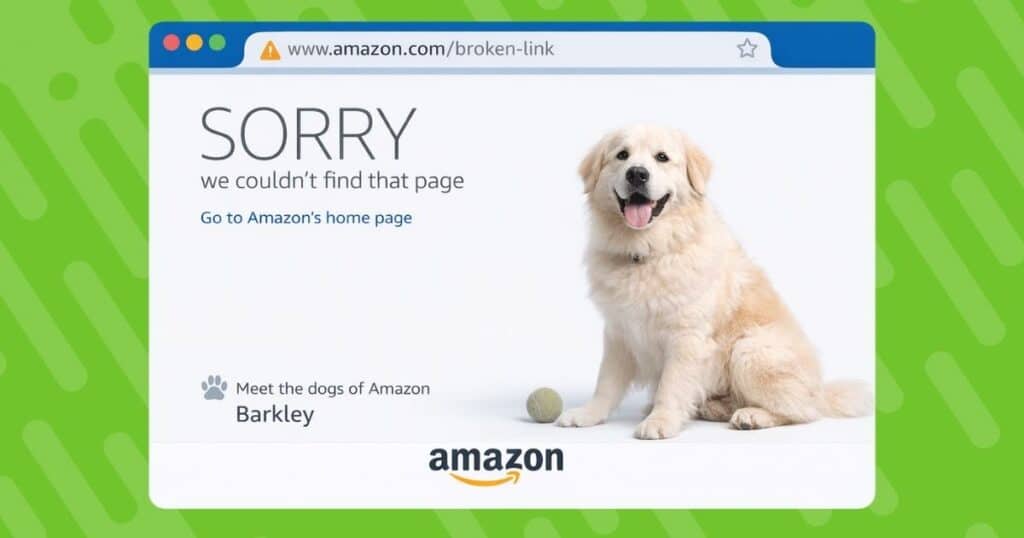
Broken or out-of-stock Amazon affiliate links silently drain your commissions and damage reader trust. When customers click your carefully placed affiliate links only to land on 404 pages or unavailable products, you lose more than just a sale; you lose credibility. Every affiliate link should work correctly to ensure users are always directed to the intended destination.
In today’s competitive content landscape, every click counts. Link health isn’t just about avoiding broken Amazon links; it’s about protecting your affiliate revenue and maintaining the professional experience your audience expects. If visitors encounter a broken link that doesn’t lead to the correct destination, it can harm both user experience and your reputation.
This guide shows you exactly how to audit, repair, and future-proof your Amazon links using Geniuslink as your automation engine. You’ll learn to identify problematic links before they cost you money, fix them without republishing content, and implement systems that keep your affiliate income flowing smoothly. That means no more leaving money on the table due to preventable link failures.
Affiliate Marketing 101: How Amazon Affiliates Earn and Lose
Affiliate marketing plays a crucial role in the digital economy, and Amazon affiliates are at the heart of this ecosystem. The basic premise is simple: you place affiliate links on your website, blog, or social media, and when visitors click those links and make a purchase, you earn a commission. These affiliate links are the lifeblood of your revenue stream, connecting your audience to relevant products and driving traffic directly to Amazon’s pages.
However, earning as an Amazon affiliate isn’t just about adding links. It’s about making sure every link works correctly. One of the most common issues affiliates face is the dreaded broken link. A broken link is any hyperlink that leads to a page that no longer exists, is out of stock, or returns an error. When visitors encounter a broken link, they hit a dead end instead of the product page, leading to a frustrating experience that can quickly erode trust.
Broken links don’t just hurt your credibility but they also directly impact your bottom line. Every broken affiliate link is a missed opportunity for commission, as potential buyers are unable to complete their purchase. Over time, these broken links can add up, leading to significant revenue loss. Worse, search engines like Google may penalize your site’s SEO if they detect too many broken links, making it harder for new visitors to find your content in search results.
Fixing broken links is a natural part of maintaining a successful affiliate site. By regularly checking and updating your affiliate links, you ensure that every link leads to a functional page, keep your visitors engaged, and maximize your earning potential. Staying vigilant about broken links and fixing them promptly is essential for any affiliate who wants to protect their revenue and maintain a positive user experience.
The Hidden Cost of Broken Amazon Affiliate Links
Lost commissions from broken links add up faster than most affiliates realize. Every 404 error or out-of-stock product represents missed sales, forfeited upsells, and abandoned shopping carts that could have been converted with proper link maintenance. Neglecting link maintenance can also lead to potential issues such as glitches, misaligned tracking, or other errors that negatively impact both revenue and user trust.
The damage extends beyond immediate revenue loss. High bounce rates from broken links hurt your SEO rankings, while frustrated visitors who encounter dead ends are less likely to trust your recommendations in the future. Your conversion rate suffers when readers click through expecting a specific product only to find Amazon’s infamous “Dogs of Amazon” 404 error page.
This neglect can erode the trust and authority you’ve meticulously built. Industry studies reveal a stark reality: as many as 25% of Amazon links eventually break due to link rot, product discontinuation, or changes in inventory. For affiliates serious about maximizing affiliate marketing ROI, treating broken links as an urgent revenue leak rather than a minor inconvenience is essential for long-term success.
How Amazon Links Go Bad: Common Failure Modes
Before applying any fix, identifying the specific type of link failure is crucial to ensure the right solution.
Understanding how Amazon links fail helps you choose the right fix strategy. The most common culprit is product discontinuation, where items get removed entirely or merged into a new ASIN. Your carefully crafted review suddenly points to nothing.
Seller inventory lapses create another point of frustration. When products show “Currently unavailable,” visitors often assume the item doesn’t exist on Amazon at all. They bounce to competitors rather than waiting for restocks or searching for alternatives.
URL structure changes can trigger the dreaded Amazon 404 dogs page, leading to a complete dead end for conversions. Sometimes Amazon reorganizes product categories or updates its URL format, breaking thousands of affiliate links overnight.
Affiliate tag errors present a particularly painful problem. If your tag gets stripped during link sharing or contains a typo, you’ll send traffic and sales to Amazon without earning any commissions. The sale happens, but you don’t get paid.
International shoppers face additional barriers when sent to the wrong Amazon storefront. A UK visitor clicking a .com link might abandon their purchase rather than searching for the product on Amazon.co.uk.
Each failure type requires a different solution: redirecting to similar products for discontinued items, updating to current URLs for structural changes, or implementing multi-store links for international audiences. After identifying the issue, correcting it is essential, whether that means updating links, fixing affiliate tags, or setting up proper redirects. Recognizing these patterns is your first step toward fixing problems systematically rather than playing endless whack-a-mole with broken links.
Manual Checking vs. Automated Monitoring
There are several ways to check for broken links, including manual and automated methods.
Manual link audits might work when you’re starting with a handful of affiliate links, but they quickly become unsustainable. Clicking through every link on your site, checking stock status, and verifying your affiliate tags takes hours.
The manual approach is also error-prone. You might miss links buried in old posts, forget to check certain product categories, or simply not notice when a product goes out of stock between checks. For sites with over 100 links, manual checking becomes practically impossible to maintain consistently. While suitable for a limited number of affiliate links, manual link audits are inefficient and time-consuming. The effort spent verifying stock and affiliate tags manually could be better utilized for content creation or conversion optimization.
Automated link monitoring transforms how you manage links. API tools continuously track and alert you to issues, allowing proactive fixes in seconds instead of hours. Manual checks take 10-20 hours monthly; automation does it in minutes, saving time and increasing revenue. It’s scalable, enabling effortless management of thousands of links so that you can focus on growth. However, after using automated tools, it’s important to double-check that all fixed or updated links are working properly to ensure no issues remain.
Geniuslink Link Health: Features and Benefits
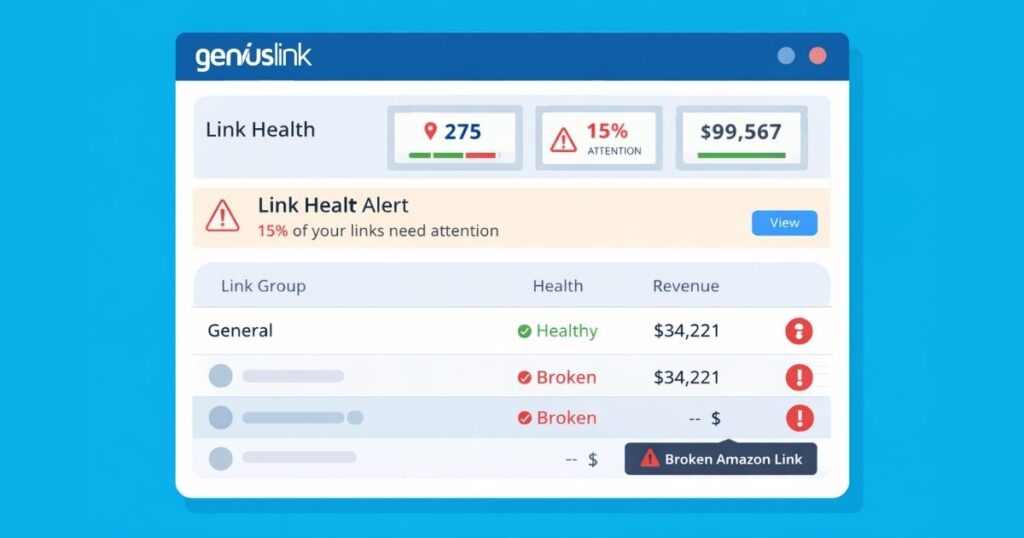
Geniuslink is a powerful tool that transforms affiliate link management from a tedious chore into an automated revenue protection system. The platform’s API-powered health checks continuously monitor your Amazon links for out-of-stock items, 404 errors, and price changes that might affect conversions.
The Link Health Report serves as your command center, displaying problematic links at a glance. Dashboard alerts and email notifications ensure you never miss critical issues. Unlike basic link checkers, Geniuslink provides actionable insights into why links fail and how to resolve them.
Geniuslink truly shines. Instead of hard-coding Amazon URLs throughout your content, you create intelligent short links that can be edited centrally. When a product goes out of stock or gets discontinued, you update the destination once in Geniuslink and the change applies everywhere that link appears, without touching your published content.
Automatic geo-routing ensures international visitors reach their local Amazon store, while device-based redirects can send mobile users to app-friendly pages. These real-time editing capabilities mean you’re always sending traffic to the most profitable destination.
The analytics layer provides crucial performance data: earnings per click (EPC), click-through rates (CTR), and revenue per link. By tracking links within Geniuslink, you can monitor campaign performance and conversions, ensuring your tracking links are optimized for maximum ROI. You see exactly which links drive revenue and which need attention.
The key benefit: Edit once in Geniuslink, fix everywhere your link lives. No more hunting through old posts or videos to update URLs. Your affiliate analytics and link management exist in one unified platform.
Step-by-Step: Setting Up Geniuslink for Amazon Affiliates
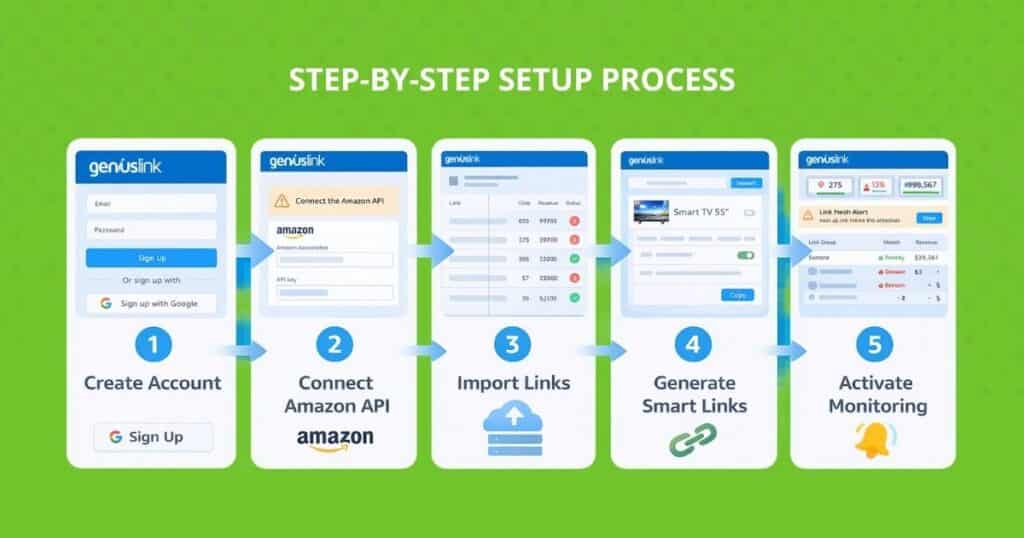
Getting started with Geniuslink setup takes less than 30 minutes. First, create your free Geniuslink account at geniuslink.com and navigate to the Settings area to connect your Amazon Associate IDs for each marketplace you target.
Before importing your links, use a broken link checker to identify any problematic or outdated URLs that should be fixed or removed during migration.
Next, import your existing links. The platform offers multiple methods: use the WordPress plugin for bulk blog imports, upload a CSV file with your current URLs, or install the browser extension to convert links as you browse. This affiliate integration captures all your existing Amazon links without manual copying.
The critical step is authenticating with the Amazon PA API (Product Advertising API). This connection enables real-time product data, including availability status and current pricing. Navigate to the Amazon settings in Geniuslink and follow the authentication prompts. You’ll need your Amazon Associate credentials.
Now generate smart links to replace your raw Amazon URLs. The link shortener creates clean, trackable links like geni.us/yourproduct. Update your content with these smart links, either manually for key pages or using bulk replacement tools.
Enable Link Health monitoring in your dashboard settings. Configure alert preferences, including immediate emails for broken links on high-traffic pages, and daily summaries for everything else. This onboarding tutorial ensures you catch issues quickly.
Finally, test the system. Deliberately create a link to an out-of-stock product and verify you receive the appropriate notification. This confirmation gives you confidence in your new safety net.
Pro tip: Use the WordPress plugin or YouTube description uploader for mass replacement. These tools can update hundreds of links in minutes rather than hours.
Organize for Scale: Groups, Tags, and Notes
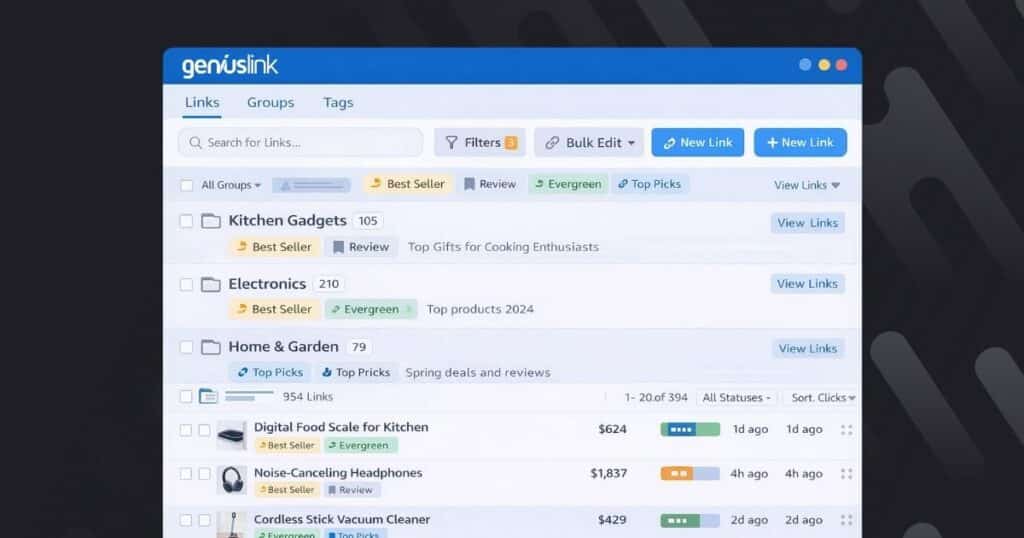
Smart organization transforms link management from chaos to clarity. Link groups in Geniuslink let you segment links by product category or niche like create a “Smartphones” group for all mobile device reviews or a “Kitchen Gadgets” group for culinary content. For comprehensive audits, include internal links in your organizational strategy to ensure all site links, not just external ones, are properly managed and checked.
Layer additional context with tags. While groups provide primary categorization, tags add flexible metadata. Tag links by traffic source (“Email,” “YouTube,” “Blog”), promotional period (“Q4 Promo,” “Black Friday”), or content type (“Review,” “Comparison,” “Tutorial”). This tagging strategy enables powerful filtering when you need to audit specific subsets.
The Notes feature adds crucial editorial context to each link. Document why you chose a specific product, when you last updated the destination, or reminders about seasonal relevance. These notes travel with the link through exports and reports, creating an audit trail for your affiliate organization.
This taxonomy accelerates bulk fixes dramatically. When a product line updates, filter by the relevant group and update all affected links simultaneously. Need to refresh all email campaign links before a holiday push? Filter by the “Email” tag and verify everything points to in-stock products.
Batch edits become possible at scale. Instead of updating links one by one, select entire groups or tag combinations and apply changes universally. This organization system grows more valuable as your link inventory expands. What starts as nice-to-have becomes mission-critical for campaign tracking and performance optimization.
Proactive Maintenance: Scheduling Regular Link Audits
Successful link audit schedules align with your existing content workflows. If you review content performance monthly, add link health to that same calendar. Quarterly audits work well for smaller sites or those with evergreen content that changes less frequently.
Start each audit by running the Geniuslink health report across all link groups. The dashboard immediately highlights problematic links, letting you prioritize fixes based on traffic and revenue impact. Export the report to a spreadsheet for team collaboration, assign specific categories to different team members if needed. Ongoing monitoring also helps you quickly identify new broken links as they appear, so you can address them before they impact user experience or SEO.
Leverage alert automation between scheduled audits. Configure Geniuslink to email you immediately when high-value links break. This real-time monitoring catches urgent issues while your regular audits help you find and fix all broken links through comprehensive reviews.
Track key performance indicators to measure your affiliate maintenance success: broken-link rate (aim for under 5%), revenue recovered through fixes, and average time to resolution. These metrics justify the time investment and highlight improvement opportunities.
Your monthly checklist should include: reviewing the health report, updating broken links to active alternatives, checking top-performing content first, documenting changes in link Notes, and analyzing patterns in link failures. This systematic approach to performance optimization ensures nothing falls through the cracks while keeping the process manageable.
Case Study: Recovering 15% Lost Revenue with Geniuslink
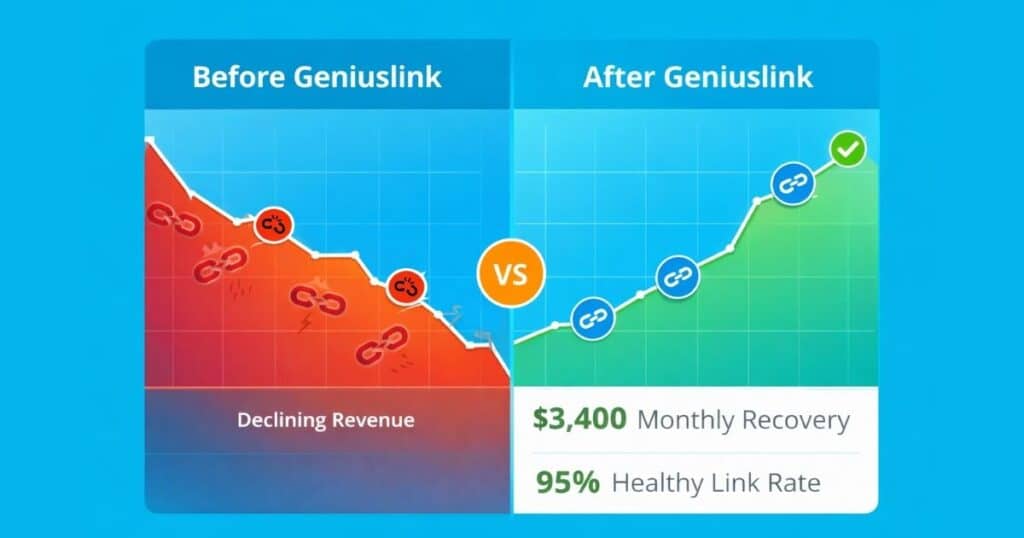
This case study serves as an example of how broken links can significantly impact revenue for affiliate sites.
A mid-sized affiliate site specializing in home electronics discovered just how much broken links were costing them. With 10,000 monthly clicks spread across 1,200 Amazon product links, they assumed occasional dead links were just part of the business.
The Geniuslink success story began with a sobering discovery. Their initial link rot audit revealed 15% of all links pointed to unavailable products or 404 pages. For months, they’d been sending valuable traffic to dead ends, losing commissions on every one of those clicks.
The team implemented solutions to address the broken links, starting with a bulk import of all existing links into Geniuslink. The health report immediately flagged 180 problematic links. Using the platform’s grouping feature, they organized links by product category and systematically updated each broken destination to available alternatives.
Results came quickly. Within 30 days of implementing Geniuslink, they recovered $3,400 in monthly revenue, which was money that had been silently leaking through broken links. Their affiliate earnings boost came purely from fixing existing content, not creating anything new.
The real revelation was ongoing monitoring. By catching new link failures within days rather than months, they maintained a 95%+ healthy link rate. Continuous monitoring turned a one-time revenue recovery into sustained earnings growth.
Key takeaway: The actual cost of broken links often exceeds what affiliates imagine. This Amazon affiliate case study demonstrates that systematic link health monitoring multiplies lifetime earnings from existing content.
Best Practices Checklist
Here are some essential tips to maintain healthy affiliate links and maximize your results:
Follow these Amazon affiliate best practices to maintain optimal link hygiene and maximize conversions:
- Always use smart links instead of raw Amazon URLs. The ability to edit destinations without republishing is invaluable for long-term content management.
- Prioritize updates for top-earning posts. Fix broken links in your highest-traffic content first for maximum revenue impact.
- Replace discontinued products with in-stock alternatives immediately. Don’t let perfect be the enemy of good—a similar available product beats a dead link every time.
- Document all changes with Notes. Create transparency for your team and yourself by recording what changed and why.
- Audit international storefronts regularly. Verify geo-routing sends visitors to the correct regional Amazon site to maximize global conversions.
- Regularly check and test all affiliate links and landing pages as part of your affiliate program management. Use specialized tools to monitor link functionality and ensure a seamless user experience.
These practices ensure compliance with Amazon’s terms while maintaining content freshness. Regular attention to link health demonstrates professionalism and care for your audience’s experience, building trust that translates to higher conversion optimization rates.
Conclusion and Next Steps
Broken Amazon links no longer have to drain your credibility or cash. By implementing Geniuslink’s automated monitoring, scheduling routine audits, and following the best practices outlined in this guide, you transform link maintenance from a reactive scramble to a proactive revenue protection strategy. These strategies apply to all websites that rely on affiliate links, as maintaining and testing websites is crucial for improving user experience, SEO, and conversions.
The path forward is clear: fix Amazon links systematically, protect affiliate revenue through automation, and focus your energy on creating great content rather than spending endless time on link checking. Start your Geniuslink trial today and watch your affiliate earnings climb while your readers enjoy a seamless shopping experience.
Take the first step now: audit your own website for broken links and ensure your site is optimized for success. Your future self (and bank account) will thank you.
Reclaim Your Lost Commissions with GeniusLink
Are you an affiliate marketer ready to eliminate broken links for good? Start your 14-day free Geniuslink trial and reclaim lost commissions today. No credit card is required.
Geniuslink helps affiliate marketers identify and fix all the broken links on your site. Join thousands of successful affiliates who’ve automated their link health. In just minutes, you’ll import your existing links, enable monitoring, and start catching revenue leaks. Don’t let another day of commissions slip through broken links.
Frequently Asked Questions (FAQs)
Does Geniuslink violate Amazon TOS? No, Geniuslink is fully compliant when you use proper Associate IDs. The service respects Amazon’s terms by maintaining your affiliate relationship while adding management capabilities.
How often are links checked? Geniuslink checks your links approximately every 24 hours through the Amazon API, catching issues quickly while respecting API rate limits.
Can I redirect to other retailers? Yes, Geniuslink supports multi-retailer choice pages. If an Amazon product becomes unavailable, you can redirect users to alternative retailers while maintaining a seamless user experience.
What if I manage multiple sites? Use separate Groups within Geniuslink to organize links by website, or use distinct affiliate tags for each property. The platform handles multiple properties seamlessly.
Is there a free trial? Yes, Geniuslink offers a 14-day free trial with full Link Health features. Test the system with your actual links before committing.
How do I troubleshoot tracking issues and ensure accurate tracking parameters? To prevent tracking issues, always double-check your tracking parameters and ensure they are set up correctly. Regularly review your tracking setup to maintain reliable website analytics and accurate marketing data.
What should I do if a link leads to broken pages? If a link results in broken pages, use link monitoring tools to identify and fix the issue promptly. Fixing broken pages is crucial for maintaining SEO health, user experience, and conversion rates.
Can I use Pretty Links for link shortening and management? Yes, Pretty Links is a popular WordPress plugin that allows you to create clean, branded, and short URLs (pretty links) for your affiliate links, making link management and updates easier.
How do I redirect links to a different domain? You can set up redirects from one domain to another to improve SEO and user experience. Geniuslink and similar tools support domain-level redirects for seamless transitions.
How can I monitor external links for breakage? Use plugins or tools that scan your website for broken external links. Monitoring external links helps maintain site health and SEO performance.
Why is having a keen eye important when reviewing tracking setup? A keen eye is essential for spotting errors or inconsistencies in your tracking setup, ensuring data accuracy and effective troubleshooting of tracking issues.
How do I identify missing affiliate links? Regularly audit your site to detect missing or broken affiliate links. Identifying missing links helps improve user experience, SEO, and conversions in affiliate marketing campaigns.
How can I manage links across multiple affiliate networks? Geniuslink and similar platforms allow you to monitor, identify, and resolve issues with affiliate links across various affiliate networks efficiently.
How can I use website analytics to monitor affiliate link performance? Set up website analytics to track affiliate link clicks and conversions. Accurate website analytics help you measure performance, troubleshoot tracking issues, and optimize your affiliate strategy.
These Amazon affiliate FAQ items address common affiliate troubleshooting concerns. For additional link health questions, the Geniuslink support team provides detailed documentation and responsive assistance.